Atlassian
How to configure the Atlassian Rovo MCP connector
The Atlassian Rovo MCP Server provides a cloud-based bridge to your Atlassian Cloud products — Jira, Confluence, Loom, Assets, Goals, Projects, Teams, and connected source-control repositories. Users can search, create, and modify issues, pages, videos, and other content through natural language. Data access respects existing Atlassian user permissions.
Connector Settings
| Field | Value |
|---|---|
| Integration Type | MCP |
| URL | https://mcp.atlassian.com/v2/mcp?tools=all |
| Transport Type | Streamable HTTP |
| Authentication Type | OAuth 2.1 |
This MCP server supports Dynamic Client Registration (RFC 7591) — OAuth Client ID and Client Secret are not required.
Use the v2 endpoint with ?tools=all to expose the full toolset. Jira document sources require it: they read issues, comments, and attachments through this connector's tools.
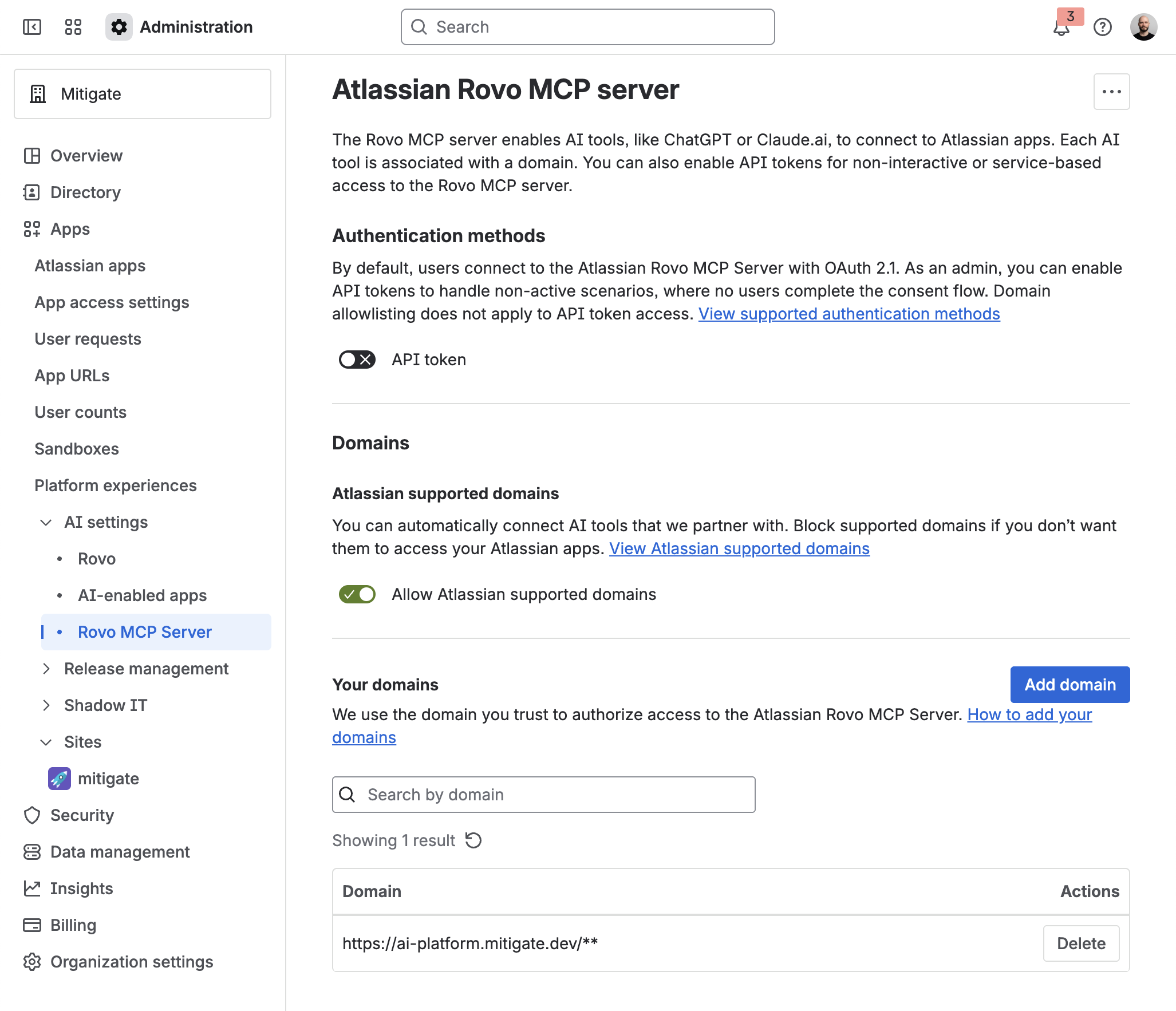
The domain ai-platform.mitigate.dev must be approved by your Atlassian organization admin before users can connect.
When connecting, users will see the message: "Your organization admin must authorize access from a domain to this site."
How to Fix (For Admins)
- Navigate to Administration: Go to admin.atlassian.com.
- Access AI Settings: Navigate to Apps → AI settings → Rovo MCP server.
- Add Domain: Select "Add domain" and enter
https://ai-platform.mitigate.dev/**.
Document Source
The Atlassian connector can also be used as a document source to ingest issues from Jira into your knowledge base.
Usage Examples
Once connected, users can interact with Atlassian products through natural language:
- "Show me all open bugs assigned to me in the PROJ project"
- "Create a new task in Jira for updating the API documentation"
- "Find the Confluence page about our deployment process"
- "Summarize the latest Loom videos shared with me"
Tools
Most tools take a cloudId parameter — the Atlassian site URL (e.g. your-site.atlassian.net) or its UUID from getAccessibleAtlassianResources. It is omitted from the parameter lists below.
Jira Tools
Add or edit Jira issue comment
addOrEditJiraIssueComment
Add a comment to a Jira issue, or edit an existing one: omit commentId to add, or pass one from listJiraIssueComments to edit.
Parameters:
- commentId - ID of an existing comment to edit. When omitted, a new comment is added
- commentBody - Comment text. Markdown by default; set contentFormat: html to pass HTML instead
- inlineFileId - Media file ID(s) from uploadAttachmentToJiraIssue to append inline to the comment, e.g. ["id1","id2"]
- issueIdOrKey - Issue key (e.g. PROJ-123) or a Jira issue URL
- contentFormat - Body format for commentBody
- inlineFileName - Optional file name(s) (from the upload step's fileName), paired to inlineFileId by index
- jsmCommentType - JSM comment type. Use internalNote for an internal note or publicComment for a customer-visible comment
- commentVisibility - Restrict comment visibility to a Jira group or role. Shape:
{"type":"group"|"role","value":"<name>"} - inlineFileCollection - Media collection(s) from the upload step, paired to inlineFileId by index (a single value applies to all)
- responseContentFormat - Format of the echoed comment body. Defaults to the format written, so an html write reads back as html
Add or edit Jira issue worklog
addOrEditJiraIssueWorklog
Log time spent on a Jira issue, or edit an existing worklog: omit worklogId to add, or pass one from listJiraIssueWorklogs to edit, which changes only the fields you pass.
Parameters:
- comment - Work description (markdown by default, or HTML with contentFormat html; converted to ADF automatically)
- started - Start time in ISO 8601 format (e.g. 2026-01-01T09:00:00.000+0000)
- timeSpent - Time spent like 2h 30m. Required when adding; optional when editing
- worklogId - ID of an existing worklog to edit. When omitted, a new worklog is added
- visibility - Restrict the worklog to a Jira group or role. Shape:
{"type":"group"|"role","value":"<name>"} - issueIdOrKey - Issue key like PROJ-123
- contentFormat - Body format for comment. Defaults to markdown. html preserves inline media across a read-modify-write: a note fetched from listJiraIssueWorklogs as html can be written straight back
Convert Jira issue hierarchy
convertJiraIssueHierarchy
Convert an existing Jira issue across hierarchy levels: a standard issue (Task, Bug, Story) into a sub-task under a parent, or a sub-task back into a standard issue.
Parameters:
- mode - preview_step1 (default) returns destination compatibility without converting. preview_step2 adds the field retain/remap/drop plan. confirm executes the conversion
- confirm - When true, executes the conversion (same as mode=confirm). Prefer mode=confirm. Preview modes never convert, even if confirm is false
- fieldRemap - Optional values for fields that are required on the destination type and empty or incompatible on the source
- issueIdOrKey - Issue key or ID to convert (e.g. PROJ-123)
- parentIssueKey - Parent issue key required when converting a standard issue into a sub-task
- acknowledgeMove - Required as true on mode=confirm when this conversion uses Jira's Move instead of a direct issue edit (preview execution.method is bulk-move, or confirm returned MOVE_CONFIRMATION_REQUIRED)
- targetIssueType - Destination issue type name or ID. Use a sub-task type to demote a standard issue, or a standard type (Task, Bug, Story) to promote a sub-task
- targetProjectKey - Optional destination project key. Omit to convert in the issue's current project
- acknowledgeChildReparent - Required as true on mode=confirm when converting a team-managed issue that already has child sub-tasks
Create Jira issue
createJiraIssue
Create a new Jira issue. Custom fields go in additional_fields: keyed by field name, values are resolved automatically, so no field lookup is needed first (user fields take accountIds); keyed by customfield_* ID, pass the value in Jira's format.
Parameters:
- labels - List of label strings (e.g. ["bug", "needs-triage"])
- parent - Parent issue key for sub-tasks or child issues (e.g. PROJ-10)
- summary - Issue summary / title
- assignee - Account ID of the assignee
- priority - Priority name (e.g. High, Medium, Low, Highest, Lowest)
- issueType - Issue type name (e.g. Bug, Task, Story, Epic). Use listJiraProjectIssueTypesMetadata to list valid types for this project if unsure
- projectKey - Project key (e.g. PROJ)
- description - Issue description in markdown, or HTML with contentFormat html. Converted to Jira ADF automatically
- contentFormat - Body format for description. Defaults to markdown; html adds panels, tables and status lozenges
- assignToSprint - Optional sprint assignment after the issue is created. Accepts a numeric sprint ID, an exact sprint name, or "active" to resolve an active sprint
- additional_fields - Additional Jira fields. Keys can be human-readable field names or raw customfield_* IDs
Create Jira issue link
createJiraIssueLink
Create a link between two existing issues — blocks, duplicates, clones, relates.
Parameters:
- comment - Optional comment on the outward issue (plain text or markdown, converted to ADF automatically)
- linkType - Link type name e.g. Blocks, Relates, Duplicates. Use listJiraIssueLinkTypes for valid names
- inwardIssue - Inward issue key e.g. PROJ-1. The link reads inwardIssue to outwardIssue using the link type's outward description, so with linkType "Blocks" inwardIssue blocks outwardIssue
- outwardIssue - Outward issue key e.g. PROJ-2. With linkType "Blocks" this is the issue that is blocked by inwardIssue
Create Jira issue remote issue link
createJiraIssueRemoteIssueLink
Create a native web link in a Jira issue's Web links section for a Confluence page or external HTTP(S) URL.
Parameters:
- url - Absolute HTTP or HTTPS URL to add to the issue
- title - Optional display text; defaults to the URL when omitted or blank
- summary - Optional short summary of the linked content
- issueIdOrKey - Target Jira issue key or ID, for example PROJ-123
- relationship - Optional relationship label; Jira uses "links to" when omitted or blank
Download Jira issue attachment
downloadJiraIssueAttachment
Get a short-lived download URL for a Jira attachment and return a local downloadCommand.
Parameters:
- outputPath - Optional local path where the file should be saved (used only to build downloadCommand)
- attachmentId - Numeric ID of the Jira attachment to download. Get it from getJiraIssue with fields: ["attachment"], which returns id, filename, size and mimeType per attachment
Edit Jira entity property
editJiraEntityProperty
Sets a single property (technical key/value store) on a specific Jira entity (issue, issueComment, issueWorklog, dashboardItem, user), creating or overwriting it.
Parameters:
- value - Full property value to store; replaces any existing value for the key
- itemId - Dashboard gadget/item ID. Required when entityType is "dashboardItem"
- accountId - User account ID. Required when entityType is "user" (including for the calling user's own properties)
- commentId - ID of an existing comment. Required when entityType is "issueComment"
- worklogId - ID of a worklog for a specific issue. Required when entityType is "issueWorklog"
- entityType - Which Jira entity type to set the property on. Determines the required identifier(s)
- dashboardId - ID for a dashboard. Required when entityType is "dashboardItem"
- propertyKey - The full property key to set. Must be namespaced under "atlassian-mcp." prefix (e.g. "atlassian-mcp.config") or call is rejected
- issueIdOrKey - Issue key (PROJ-123) or a Jira issue URL. Required for entityTypes "issue" and "issueWorklog"
Edit Jira issue
editJiraIssue
Edit an existing Jira issue. Custom fields go in additional_fields: keyed by field name, values are resolved automatically (user fields take accountIds); keyed by customfield_* ID, pass the value in Jira's format.
Parameters:
- fields - Jira fields payload to set, keyed by field name or customfield_* ID. To clear a field, pass explicit null (e.g.
{"resolution": null}) - inlineFileId - Media file ID(s) from uploadAttachmentToJiraIssue to append inline to the description, e.g. ["id1","id2"]
- issueIdOrKey - Issue key (e.g. PROJ-123)
- contentFormat - Body format for rich-text fields (description/environment)
- inlineFileName - Optional file name(s) (from the upload step's fileName), paired to inlineFileId by index
- rankAfterIssue - Optional. Rank this issue immediately after the given issue key or ID (LexoRank relative anchor)
- rankBeforeIssue - Optional. Rank this issue immediately before the given issue key or ID (LexoRank relative anchor)
- additional_fields - Additional Jira fields. Keys can be human-readable field names or raw customfield_* IDs
- rankCustomFieldId - Optional. Numeric Rank field id for this rank call (e.g. 10020). Pass only when the user explicitly provides a Rank field id, or asks to reorder on a specific board's Rank field
- inlineFileCollection - Media collection(s) from the upload step, paired to inlineFileId by index (a single value applies to all)
- responseContentFormat - Output format for rich-text fields in the returned issue. Defaults to markdown
Find Jira assignable users
listJiraIssueAssignableUsers
List the users who can actually be assigned work in a project or on an issue. Filters by assign permission, which a plain name search does not, so prefer it when choosing an assignee for editJiraIssue or createJiraIssue.
Parameters:
- query - Narrow the result to users whose display name or email matches this term. Omit it to list every assignable user
- project - Project key (e.g. PROJ) whose assignable users to list. Pass this or issueKey — with neither, Jira rejects the request
- issueKey - Issue key (e.g. PROJ-123) whose assignable users to list. More accurate than project for an issue that already exists, because permission and security-level rules are evaluated against that issue
Get current Jira user
getJiraCurrentUser
Get the calling user's own Jira profile. Use it to turn "me" or "my" into an accountId, and to read the user's time zone before resolving relative dates.
Parameters:
- expand - Comma-separated list of extra data to include. Options: groups (all groups you belong to) and applicationRoles (application roles you are assigned)
Get issue changelog
listJiraIssueChangelogs
Get a Jira issue's field-change history — field edits only — paginated oldest-first with no ordering options.
Parameters:
- view - Output view preset. Default: "compact". Options: "compact", "evidence". compact = minimal fields for scanning; evidence = decision-relevant detail; full = complete response
- startAt - Zero-based index of the first changelog entry to return (for pagination). Defaults to 0
- maxResults - Maximum changelog entries per page (1-50). Defaults to 20; larger pages risk exceeding the client's token limit and failing the call
- issueIdOrKey - Issue key (PROJ-123), numeric ID, or a Jira issue URL
Get issue comments
listJiraIssueComments
Get a paginated list of comments for a Jira issue. Use this instead of getJiraIssue when an issue has many comments — getJiraIssue embeds at most 20 and cannot page them.
Parameters:
- view - Output view preset. Default: "compact". Options: "compact", "evidence", "full". compact = minimal fields for scanning; evidence = decision-relevant detail; full = complete response
- expand - Comma-separated list of extra data to include on each comment, e.g. "renderedBody" (HTML-rendered body) or "properties"
- orderBy - Order comments by created date — "created"/"+created" (oldest first) or "-created" (newest first)
- startAt - Zero-based index of the first comment to return (for pagination). Defaults to 0
- maxResults - Maximum number of comments to return per page (1-100). Defaults to 100. Read total from the response for the full count
- issueIdOrKey - Issue key (PROJ-123), numeric ID, or a Jira issue URL
- reactionDetail - Reaction enrichment level. "none" (default) returns comments only, with no Reactions API call. "summary" adds emoji counts and whether the current user reacted. "users" also names who reacted — ask for it only when attribution is requested, since it costs an extra request per distinct emoji and reports when it could not expand every one
- responseContentFormat - Format for comment bodies. Defaults to markdown. Set html to receive HTML, which is lossless, so a body can be passed straight back to addOrEditJiraIssueComment with contentFormat: html
Get issue worklogs
listJiraIssueWorklogs
Get a paginated list of worklogs (logged time) for a Jira issue. Ordered by worklog creation time, not by when the work started — so the last page is not the most recent work.
Parameters:
- view - Output view preset. Default: "compact". Options: "compact", "evidence", "full". compact = minimal fields for scanning; evidence = decision-relevant detail; full = complete response
- expand - Extra data to include on each worklog. The only supported value is "properties" (worklog properties)
- startAt - Zero-based index of the first worklog to return (for pagination). Defaults to 0
- maxResults - Maximum number of worklogs to return per page (1-100). Defaults to 100. Read total from the response for the full count
- issueIdOrKey - Issue key (PROJ-123), numeric ID, or a Jira issue URL
- startedAfter - Only return worklogs whose work started at or after this time, as a UNIX timestamp in milliseconds
- startedBefore - Only return worklogs whose work started strictly before this time, as a UNIX timestamp in milliseconds
- responseContentFormat - Format for worklog notes. Defaults to markdown. Set html to receive HTML, which is lossless, so a note can be passed straight back to addOrEditJiraIssueWorklog with contentFormat: html
Get Jira entity property
getJiraEntityProperty
Returns a single property (technical key/value store) from a specific Jira entity (issue, issueComment, issueWorklog, dashboardItem, user), or lists all its property keys when propertyKey is omitted.
Parameters:
- itemId - Dashboard gadget/item ID. Required when entityType is "dashboardItem"
- accountId - User account ID. Required when entityType is "user" (including for the calling user's own properties)
- commentId - ID of an existing comment. Required when entityType is "issueComment"
- worklogId - ID of a worklog for a specific issue. Required when entityType is "issueWorklog"
- entityType - Which Jira entity to read the property from. Determines the required identifier(s)
- dashboardId - ID for a dashboard. Required when entityType is "dashboardItem"
- propertyKey - The exact property key to fetch (a single known key; no wildcards). Omit to list all property keys on the entity instead
- issueIdOrKey - Issue key (PROJ-123) or a Jira issue URL. Required for entityTypes "issue" and "issueWorklog"
Get Jira issue
getJiraIssue
Get a Jira or JSM issue by key or ID. Use for one known issue; use searchJiraIssuesUsingJql to find or list many issues.
Parameters:
- view - Output view preset. Default: "compact". Options: "compact", "evidence", "full". compact = minimal fields for scanning; evidence = decision-relevant detail; full = complete response
- expand - Additional Jira expand tokens (comma-separated), e.g. "renderedFields,changelog"
- fields - Custom Jira field IDs to fetch (e.g. ["customfield_10010", "customfield_10020"])
- failFast - When true, forwards Jira's
failFastquery flag for this GET. Omit for Jira default behavior - properties - Issue entity property keys to return (Jira
propertiesquery param, repeated per key) - fieldsByKeys - When true, each entry in
fieldsis interpreted as a Jira field key (e.g. "summary", "description") instead of a field id - issueIdOrKey - Issue key (PROJ-123), numeric ID, or a Jira issue URL
- includeEditableFields - When true, also return compact metadata for fields the authenticated user can edit on this issue, including type, allowed values, and operations
- responseContentFormat - Format for rich-text bodies — description and environment, plus any comment bodies the view returns
Get Jira issue transitions
listJiraIssueTransitions
List the workflow transitions this issue can take right now, for the calling user.
Parameters:
- expand - Comma-separated expand tokens for extra detail. Use "transitions.fields" to include the fields shown on each transition's screen (for use with transitionJiraIssue)
- issueIdOrKey - Issue key (e.g. PROJ-123) or numeric ID
- transitionId - Return only the transition with this ID
- sortByOpsBarAndStatus - When true, sort by ops-bar sequence then status category (Todo, In Progress, Done); otherwise by ops-bar sequence only (default false)
- skipRemoteOnlyCondition - When true, include transitions hidden by the "Hide From User" condition (default false)
- includeUnavailableTransitions - When true, include transitions that currently fail a condition (default false)
Get Jira issue type field metadata
getJiraIssueTypeMetaWithFields
Returns the schema and field metadata for a specific issue type in a project, useful for creating issues with correct fields.
Parameters:
- startAt - Index of the first field to return (page offset). Defaults to 0
- maxResults - Maximum fields to return per page (max 200, default 50)
- issueTypeId - Issue type ID
- projectIdOrKey - Project ID or key (e.g. PROJ or 10000)
- requiredFieldsOnly - When true (default), returns only the fields that are required to create an issue of this type, reducing response size
Get Jira project components
listJiraProjectComponents
List a Jira project's components with their ids, names, lead and assignee settings, and issueCount — 0 means no issues use a Jira component; Compass results list only components already linked to issues. realAssignee is who actually receives issues when the configured assignee cannot be used.
Parameters:
- query - Optional case-insensitive literal filter that matches component name or description
- orderBy - Optional sort order. Sort by description, issueCount, lead, or name. Prefix with - for descending or + for ascending
- startAt - Pagination offset. Use 0 for the first page and previous startAt + maxResults for the next page
- maxResults - Maximum components to return per page. Use a smaller value when the user asks for a limited sample
- projectIdOrKey - Jira project key or numeric project ID whose components should be listed
- componentSource - Optional component source filter: jira (default Jira components), compass (connected Compass components), or auto (Compass components when the project is opted into Compass, otherwise Jira components)
Get Jira project issue types
listJiraProjectIssueTypesMetadata
Returns all issue types available in a Jira project, useful for knowing which issue types can be created.
Parameters:
- startAt - Index of the first issue type to return (page offset). Defaults to 0
- maxResults - Maximum issue types to return per page (max 200, default 50)
- projectIdOrKey - Project ID or key (e.g. PROJ or 10000)
Get Jira project version related work
getJiraProjectVersionRelatedWork
List the related work on a Jira project version (release): the designs, test plans, runbooks and change records teams attach to it.
Parameters:
- versionId - ID of the version. Use getJiraProjectVersions to find the ID
Get Jira project versions
getJiraProjectVersions
List a Jira project's releases/versions (pass projectIdOrKey), or fetch a single version (pass versionId) — provide exactly one.
Parameters:
- query - Filter versions by name or description (case-insensitive substring match). List mode only
- status - Filter by version status. Array of any of: "released", "unreleased", "archived"
- include - Extra sections to add to every version returned. Allowed values: "driver" (the resolved driver display name) and "approvers" (approvers with displayName, status, description, declineReason)
- orderBy - Order results by a field. Options: description, name, releaseDate, sequence, startDate
- startAt - Pagination offset (default 0). List mode only; ignored when versionId is provided
- versionId - The numeric ID of a single version (release) to fetch. Provide either versionId or projectIdOrKey (not both); required when projectIdOrKey is omitted
- maxResults - Maximum results per page (default 50). List mode only; ignored when versionId is provided
- projectIdOrKey - The project key (e.g. PROJ) or numeric project ID to list versions for. Use listJiraProjects to find the key if not known
Get Jira projects
listJiraProjects
Find the Jira projects the calling user can see — use it to resolve the projectKey that createJiraIssue requires, or the project a JQL search filters on.
Parameters:
- query - Filter results by a literal string matching project key or name (case insensitive)
- action - Filter by the action the user can perform on the project: view, browse, edit, or create
- expand - Comma-separated list of extra data to include per project
- startAt - Index of the first result to return (page offset). Defaults to 0
- maxResults - Maximum results to return per page (max 100, default 50)
Get Jira remote issue links
listJiraIssueRemoteIssueLinks
List the Confluence pages and external URLs linked from an issue's Web links section.
Parameters:
- globalId - Return only the link with this globalId — the creating system's identifier for the remote item, e.g. "appId=456&pageId=12345" for a Confluence page
- issueIdOrKey - Issue key like PROJ-123
Get Jira user
getJiraUser
Get a Jira user's profile by account ID, including time zone, locale and active status, plus groups and application roles when asked for via expand.
Parameters:
- expand - Comma-separated list of extra data to include. Options: groups (all groups the user belongs to) and applicationRoles (application roles the user is assigned)
- accountId - The account ID of the user to retrieve
List Jira dashboards
listJiraDashboards
Returns Jira dashboards visible to the current user for discovery and linking workflows.
Parameters:
- status - Optional status filter. Allowed values are active, archived, or deleted
- groupId - Optional group ID filter for dashboards shared to a specific group. Do not combine with groupname
- orderBy - Optional sort order
- startAt - Index of the first result to return (page offset). Defaults to 0
- accountId - Optional owner account ID filter (preferred over deprecated owner username)
- groupname - Optional group name filter for shared dashboards (prefer groupId when available)
- projectId - Optional project ID filter for dashboards shared to a specific project
- maxResults - Maximum results to return per page (default 50, max 100)
- dashboardName - Optional dashboard name filter (maps to Jira dashboardName)
List Jira issue link types
listJiraIssueLinkTypes
List the issue link types configured on this site, each with its name and its inward and outward wording (name "Blocks", inward "is blocked by", outward "blocks").
List Jira statuses
listJiraStatuses
List the statuses a Jira issue can be in — for a project (per work type), for one status looked up by ID or name, or across the whole site by name or category.
Parameters:
- mode - Which question to answer. "project" lists a project's statuses per work type (e.g. what statuses a Bug can be in for PROJ) — pass issueType to narrow to one work type. "status" resolves a single status you saw elsewhere (changelog, JQL, user phrasing) to its ID, name, and category. "site" searches statuses across the site by nameContains and/or statusCategory, returning ID and name only — use mode "status" for the full detail on any one of them
- issueType - Only with mode "project". Narrows the result to one work type, matched by name or ID (e.g. "Bug"), so the statuses returned are exactly that work type's
- projectKey - Project key (e.g. PROJ) or numeric project ID — not an issue key. Required when mode is "project"
- nameContains - Only with mode "site". Case-insensitive substring match on the status name. Combine with statusCategory to narrow further
- statusCategory - Only with mode "site". Restricts results to one status category: "new" (not started), "indeterminate" (in progress), or "done"
- statusIdOrName - Only with mode "status". Numeric status ID (preferred) or status name
Lookup Jira account ID
lookupJiraAccountId
Look up a Jira user account ID by display name or email — skip it if you already have the accountId.
Parameters:
- query - User name or email to search for
- maxResults - Max results (default 10)
Manage Jira project version
manageJiraProjectVersion
Create, update, release, or archive a Jira project version (release or fix version). create returns the version id the other actions need.
Parameters:
- name - Version name (e.g. "v2.1.0"). Required for "create", optional for "update"
- action - The version operation to perform
- driver - Atlassian account ID (AAID) of the version driver, not a name. Used by "create" and "update"
- archived - Whether the version is archived. Used by "create" and "update"
- released - Whether the version is released. Used by "create" and "update"
- startDate - Start date in yyyy-mm-dd format (ISO 8601). Used by "create" and "update"
- versionId - ID of the version. Required for "update", "release", "archive"
- description - Description of what this version includes. Used by "create" and "update"
- releaseDate - Release date in yyyy-mm-dd format (ISO 8601). Used by "create", "update", and "release"
- projectIdOrKey - Project key (e.g. "PROJ") or numeric ID. Required for "create"
- moveUnfixedIssuesTo - Version ID to move any unresolved issues to when releasing. Used by "release" only; reassigns the fixVersion of open issues from this version to the given one
Manage Jira project version related work
manageJiraProjectVersionRelatedWork
Create or update related work links on a Jira project version (release). To read a version's existing related work, use getJiraProjectVersionRelatedWork.
Parameters:
- url - URL of the related work link. Any valid http(s) URL is accepted — a runbook, dashboard, change record, or a link to any other system
- title - Display title for the related work link. Used by "create" and "update". Optional on "create" — when omitted or blank, the URL is used as the title
- action - The related work operation to perform
- category - Category of the related work. Required for "create"; on "update" it is optional and, when omitted, the existing category is left unchanged
- versionId - ID of the version. Use manageJiraProjectVersion or getJiraProjectVersions to find the ID
- relatedWorkId - ID of an existing related work item. Required for "update"; it must match an item that already exists on the version (validated before the update is applied)
Search Jira filters
listJiraFilters
Search saved Jira filters visible to the current user, returning their IDs and JQL.
Parameters:
- id - Optional list of specific filter IDs to return. Jira accepts at most 200 IDs per call (
id=10000&id=10001) - expand - Comma-separated expand tokens on GET /rest/api/3/filter/search. jql, owner, and description are expand-only
- orderBy - Optional sort order. Defaults to Jira's own ordering when omitted
- startAt - Index of the first result to return (page offset). Defaults to 0
- accountId - Optional owner account ID used to return filters owned by that user
- projectId - Optional numeric project ID used to return filters scoped to a project. Use listJiraProjects to resolve a project key to its ID
- filterName - Optional filter name to match. Partial matches are returned unless isSubstringMatch is false
- maxResults - Maximum results to return per page. Jira defaults to 50
Search Jira issues using JQL
searchJiraIssuesUsingJql
Search for Jira issues using JQL, with an optional approximate count. Use view: "evidence" to fetch and map custom fields.
Parameters:
- jql - JQL query string e.g. "project = PROJ AND status = 'In Progress'". If the tool returns a repairHint, follow it and retry
- view - Output view preset. Default: "compact". Options: "compact", "evidence", "full". compact = minimal fields for scanning; evidence = decision-relevant detail; full = complete response
- fields - Fields per issue (e.g. ["summary", "status", "customfield_10010"]). customfield_* IDs are site-specific — discover the correct id for story points etc. on this Cloud site
- maxResults - Maximum results to return (default 50, max 100)
- nextPageToken - Pagination token from a previous response to fetch the next page
- searchResultMode - Default "issues". Never count for normal search or if nextPageToken used. If total for same query is known, reuse it
- responseContentFormat - Format for rich-text bodies (description, environment, comments) when the view returns them
Transition Jira issue
transitionJiraIssue
Move a Jira issue through its workflow and/or into a sprint or the backlog — at least one is required.
Parameters:
- fields - Optional Jira field values to apply during the workflow transition
- update - Optional Jira field update operations to apply during the workflow transition. A comment passed here may be dropped without error — the transition reports success and no comment is created
- boardId - Only used when assignToBacklog is true: targets this specific board's backlog (board IDs from listJiraBoards)
- sprintId - Assign the issue into this sprint. Mutually exclusive with assignToBacklog
- issueIdOrKey - Issue key like PROJ-123
- transitionId - Transition ID (get from listJiraIssueTransitions). Provide either transitionId or transitionName
- transitionName - Name of the transition itself, not the target status — the two often differ, so "Done" does not match a transition named "Review->Done"
- assignToBacklog - Set true to assign the issue to the backlog, mutually exclusive with sprintId. Optionally use boardId to target a specific board's backlog
- historyMetadata - Optional issue history metadata to attach to the workflow transition
Upload Jira issue attachment
uploadAttachmentToJiraIssue
Attach a single local file to a Jira issue. Two phases: (1) call with filePath only to get a local uploadCommand; run it from your shell to upload the bytes and obtain a fileId; (2) call again with that fileId to attach the file to the issue.
Parameters:
- fileId - Media file ID returned by running the phase-1 uploadCommand. Provide for phase 2 to attach the uploaded file to the issue
- filePath - Local path of the file to attach (absolute, or relative to where uploadCommand is run)
- issueIdOrKey - Issue key (e.g. PROJ-123) or a Jira issue URL
Watch or unwatch Jira issue
watchJiraIssue
Add or remove the calling user as a watcher on a Jira issue. Always acts on you — it cannot add or remove another person, and it does not list who is watching.
Parameters:
- action - Whether to watch or unwatch the issue as the calling user. Defaults to "watch"
- issueIdOrKey - Issue key (e.g. PROJ-123) or a Jira issue URL
Jira Boards and Sprints Tools
Create Jira board
createJiraBoard
Create a new company-managed Jira Software board (scrum or kanban) from an existing filter.
Parameters:
- name - Display name for the new board. Must be less than 255 characters
- type - Company-managed board type: scrum or kanban
- filterId - ID of a Jira filter the user can view
- location - Optional board container, controlling only where the board is filed in navigation — not which issues it shows
Get Jira board configuration
getJiraBoardConfig
Returns the configuration for a Jira board; filter, column layout, and each column's mapped statuses with their id, name and category.
Parameters:
- boardId - Numeric ID of the board. Get from listJiraBoards
Get Jira board issue data
getJiraBoardIssueData
Get the issues on a Jira board, its backlog, or all of them, with optional count and JQL filtering.
Parameters:
- jql - Optional JQL to further filter the issues, e.g. "status = 'In Progress' AND assignee = currentUser()"
- view - Output view preset. Default: "compact". Options: "compact", "evidence", "full". compact = minimal fields for scanning; evidence = decision-relevant detail; full = complete response
- fields - Fields per issue (e.g. ["summary", "status", "customfield_10010"]). customfield_* IDs are site-specific — discover the correct id for story points etc. on this Cloud site
- boardId - Numeric ID of the board. Get from listJiraBoards
- dataset - Which issues to return. "board": issues on the active board (for scrum boards, those in current/future sprints). "backlog": backlog issues (for scrum boards, those with no sprint). "all": every issue on the board and backlog
- maxResults - Maximum number of issues to return (default 50, max 100)
- nextPageToken - Pagination token from a previous response to fetch the next page
- searchResultMode - Never count for a normal listing or if nextPageToken is used. If the total for the same board/dataset/JQL is already known, reuse it
- responseContentFormat - Format for rich-text bodies (description, environment, comments) when the view returns them
Get Jira board sprint data
getJiraBoardSprintData
Resolve a Jira board plus its sprint data in one call. Supports board lookup by name, sprint lookup by name, and defaults to the active sprint when sprintId and sprintName are omitted.
Parameters:
- boardId - Jira board ID. Preferred when already known because it avoids board-name ambiguity
- sprintId - Specific sprint ID to resolve on the selected board
- boardName - Jira board name to resolve when boardId is unknown. Uses an exact case-insensitive name match when possible; narrow with projectKeyOrId or boardType if multiple boards share a similar name
- boardType - Optional board type filter for board lookup
- sprintName - Specific sprint name to resolve on the selected board. When omitted, the tool resolves the board's active sprint by default
- includeIssues - When true (default), also fetch every issue in the resolved sprint and compute assigned-to-me, at-risk, and progress metrics
- projectKeyOrId - Optional Jira project key or numeric project ID used to narrow board lookup
List Jira board sprints
listJiraBoardSprints
List a board's sprints — past, active or upcoming — or resolve a sprint name to the numeric sprintId that transitionJiraIssue and manageJiraSprint take.
Parameters:
- state - Optional sprint state filter. Use all or omit to return all sprint states
- boardId - Numeric ID of the Scrum board. Get from listJiraBoards
- startAt - Index of the first result to return (page offset). Defaults to 0
- maxResults - Maximum results to return per page. Jira defaults to 50
List Jira boards
listJiraBoards
List Jira boards visible to the current user. Use it to get board IDs for getJiraBoardIssueData, getJiraBoardConfig and listJiraBoardSprints; getJiraBoardSprintData can resolve a board by name directly.
Parameters:
- name - Optional partial board name filter
- type - Optional board type filter. Use all to omit Jira's type filter, CMPScrum for company-managed Scrum boards, CMPKanban for company-managed Kanban boards, and TMP for Jira's "simple" boards
- expand - Optional comma-separated expand tokens such as admins or permissions
- orderBy - Optional sort order. Supported values are name, -name, or +name
- startAt - Index of the first result to return (page offset). Defaults to 0
- filterId - Optional filter ID used to find boards relevant to a Jira filter
- maxResults - Maximum results to return per page. Jira defaults to 50
- includePrivate - When true, append private boards to the end of the result list
- projectKeyOrId - Optional project key or numeric ID used to find boards relevant to a project
- projectTypeLocation - Optional list of project type locations such as software or service_desk
- negateLocationFiltering - When true, negates location-based filters such as project or project type
Manage Jira sprint
manageJiraSprint
Create, add issues to, start, update, or close a Jira sprint; get a sprintId from listJiraBoardSprints. create returns the new sprint's id, which every later action needs. update rewrites the whole sprint, so any of name, goal, startDate or endDate you omit is cleared — resend the ones to keep; start and close keep them.
Parameters:
- goal - Sprint goal. Used by "create", "start", and "update"
- name - Sprint name. Required for "create"; optional for "start" and "update"
- action - Which sprint lifecycle action to perform
- boardId - Numeric Jira board ID. Required for "create"
- endDate - Sprint end date/time in ISO 8601 format (e.g. 2026-08-14T18:00:00.000+0000)
- sprintId - Numeric Jira sprint ID. Required for "start", "update", and "close"
- startDate - Sprint start date/time in ISO 8601 format (e.g. 2026-08-03T09:00:00.000+0000)
- storyPoints - Optional issue-key → estimate map to apply before adding issues to the sprint or starting it
- issueIdsOrKeys - Issue keys or IDs to move into the sprint when action = "addIssues" or "start". Example: ["PROJ-123", "PROJ-456"]
Confluence Tools
Add Confluence content permissions
addConfluenceContentPermissions
Adds one or more content-level permission grants to a single Confluence content entity.
Parameters:
- contentId - Numeric ID of the Confluence content entity (page, blog post, whiteboard, database, folder, etc.) to add permission grants to
- permissions - Permission grants to add. Array of objects, each with an
operation(read | update) and aprincipalsarray
Add emoji reaction to Confluence content
addConfluenceReaction
Add emoji reaction to Confluence content
Parameters:
- emojiId - Emoji ID as hex codepoint (e.g. 1f44d for 👍, 1f624 for 😤) or custom emoji UUID
- contentId - Numeric Confluence content ID (page, blog post, or comment)
Add labels to Confluence content
addLabelsToConfluenceContent
Add labels to any Confluence content (page, blogpost, attachment, custom content)
Parameters:
- labels - Labels to add. Provide 1-50 entries
- contentId - Numeric Confluence content id (page / blogpost / attachment / custom content)
Archive Confluence content
archiveConfluenceContent
Archive a single Confluence content entity
Parameters:
- contentId - Numeric ID of the Confluence content to archive
Complete Confluence inline task
completeConfluenceTask
Mark a Confluence inline task as complete
Parameters:
- taskId - The ID of the Confluence inline task to mark complete
Convert Confluence content mode
convertConfluenceContentMode
Convert a Confluence page or live doc between classic page mode and live-doc mode
Parameters:
- contentId - Numeric Confluence content ID. Provide either contentId or contentUrl
- contentUrl - Full Confluence content URL. Provide either contentUrl or contentId
- targetMode - Target mode to convert the content into
Copy Confluence content
copyConfluenceContent
Copy a Confluence page, whiteboard, database, folder, or embed to a new parent
Parameters:
- title - Explicit title for the copied content (1–255 chars)
- contentId - ID of the source Confluence content entity to copy. Numeric content ID (up to 19 digits)
- parentContentId - ID of the parent content entity to copy under. Provide this OR destinationSpaceKey, not both
- destinationSpaceKey - Key of the destination space to copy to the root of. Provide this OR parentContentId, not both
Create Confluence attachment
createConfluenceAttachment
Prepare a Confluence attachment upload and return a local curl command
Parameters:
- comment - Optional attachment version comment to include in the returned uploadCommand
- fileSize - Optional local file size in bytes. Used by Confluence to fail fast if the file is too large
- contentId - Numeric ID of the Confluence content that will own the attachment. Confluence content IDs are int64 values (max 19 digits)
- localFilePath - Absolute or relative local file path to upload. This is used only to build uploadCommand; it is not sent to Confluence during prepare
Create Confluence comment
createConfluenceComment
Create or reply to a comment on a Confluence page or blog post
Parameters:
- body - Comment body object. Use
{ "format": "markdown" | "html", "value": "..." }. format is required and must be "markdown" or "html"; value is required, non-empty, and at most 4096 characters - contentId - Page or blog post ID. Required for top-level comments. Omit for replies
- commentType - Top-level comment type: "footer" for page-level comments or "inline" for anchored comments
- inlineSelection - Required only for top-level inline comments. Omit for replies
- parentCommentId - ID of a top-level comment to reply to. Required for replies. Must reference a top-level comment, not a reply
Create Confluence content
createConfluenceContent
Create a new Confluence page, blog post, live doc, whiteboard, database, embed, smart link, or folder.
Parameters:
- body - Before composing this body, follow the space-instruction decision rule in the tool description
- draft - If true, create the content as a draft instead of publishing it. Only supported when contentType is page or blogpost
- title - Title for the new content. 1-255 characters
- parent - Parent destination for the new content
- private - If true, the created content is private to the caller: only the creator has view and edit access
- contentType - Type of content to create. One of: page, live_doc, blogpost, whiteboard, database, embed, smart_link, folder, slide
- contentWidth - Optional page width for doc types only: page, live_doc, and blogpost. Omit unless the user explicitly requests a width; omission creates a narrow page
Create Confluence space
createConfluenceSpace
Create a Confluence space. Successful responses include id, key, and homepageId (the homepage / sidebar root content ID).
Parameters:
- key - Optional short unique key for the new space. Provide either key or alias; alias is required when key is omitted
- name - Display name for the new Confluence space
- alias - Optional alias used as the space identifier in Confluence page URLs. Provide either alias or key; key is required when alias is omitted
- description - Optional plain-text description for the new space
- templateKey - Optional Confluence space template key
- roleAssignments - Exact initial RBAC role assignments for the new space. When provided, default space roles are not applied and at least one Admin role assignment is required
- createPrivateSpace - Set to true only when the user explicitly asks for a private space. Do not combine with roleAssignments or copySpaceAccessConfiguration
- copySpaceAccessConfiguration - Existing numeric space ID to copy access configuration from. Do not combine with roleAssignments or createPrivateSpace
Diff Confluence content versions
diffConfluenceContentVersions
Compute a unified diff between two versions of a Confluence page, live doc, or blog post
Parameters:
- contentId - Numeric ID of the Confluence page, live doc, or blog post
- to_version - Positive version number for the later side of the comparison
- from_version - Positive version number for the earlier side of the comparison
- content_format - Body format used to compute the diff. Defaults to markdown
Disable Confluence public link
disableConfluencePublicLink
Disable the external public link (anonymous share) for a Confluence page
Parameters:
- contentId - Numeric ID of the Confluence page to disable the public link for
Download Confluence attachment
downloadConfluenceAttachment
Get a Confluence attachment download URL and return a local curl command
Parameters:
- version - Optional attachment version. Omit to download the latest version
- outputPath - Optional absolute or relative local path where the downloaded file should be saved
- attachmentId - Numeric or att-prefixed ID of the Confluence attachment to download. The numeric portion may contain up to 19 digits
Enable Confluence public link
enableConfluencePublicLink
Enable the external public link (anonymous share) for a Confluence page
Parameters:
- contentId - Numeric ID of the Confluence page to enable the public link for
Export Confluence content
exportConfluenceContent
Export Confluence content as PDF or Word and return a download link
Parameters:
- format - Export format. Use "pdf" for a PDF document or "word" for a legacy Microsoft Word .doc file
- contentId - Numeric Confluence content ID to export. Must be a positive numeric string (e.g. "123456")
Get a Confluence content version
getConfluenceContentVersion
Get one historical version of a Confluence page, live doc, or blog post
Parameters:
- contentId - Numeric ID of the Confluence page, live doc, or blog post
- versionNumber - Positive version number to retrieve
- content_format - Optional historical body format. Omit to return version metadata without rendering the body
Get Confluence approval
getConfluenceApproval
Get Confluence page approval availability, approval status, reviewers, and optional progress or history.
Parameters:
- limit - Maximum number of expanded history entries to return (1-100, default 25)
- cursor - Opaque history pagination cursor returned from a previous expanded history response
- expand - Optional details to include in the response. Values are progress and history. Up to 2 values
- contentId - Numeric Confluence page identifier, up to 19 digits. Approvals support pages only, not live docs or blog posts
- contentStatus - Content version whose approval state should be returned; omit when only checking availability
Get Confluence attachment metadata
getConfluenceAttachment
Get Confluence attachment metadata by attachment ID
Parameters:
- version - Optional attachment version. Omit to fetch the latest version metadata
- attachmentId - Numeric or att-prefixed ID of the Confluence attachment to inspect. The numeric portion may contain up to 19 digits
Get Confluence comment
getConfluenceComment
Get a single Confluence comment by ID
Parameters:
- commentId - ID of the comment to fetch
- body-format - Response body format (default markdown)
- comment-type - Assert the comment surface ("footer" or "inline"). Omit to auto-detect
- include-replies - Include replies as a flat descendant list (default true). Pass false to omit and read only the count
Get Confluence content
getConfluenceContent
REQUIRED: Supply at least one content locator: content_id or content_url. Read any Confluence content (page, blog, live doc, comment, whiteboard, embed, database, folder).
Parameters:
- draft - If true, read the draft version instead of current. Only supported for pages and blog posts
- detail - Response shape for document-style reads. summary = title + excerpt + counts (default, cheap). ai_summary = the generated AI summary when available, otherwise null; it does not fall back to the standard excerpt. outline = heading tree (cheap, for navigation). full = body in the requested format (use when intending to edit)
- content_id - Required when content_url is omitted. Numeric Confluence content ID, or a Confluence tiny link key (the encoded part from /wiki/x/ URLs, e.g. 4_sXAQ)
- content_url - Required when content_id is omitted. Full URL of the Confluence content
- content_format - Body format. Doc types: html (default) or markdown. Document HTML can contain supported macro wrappers instead of content displayed in Confluence web
Get Confluence content permissions
getConfluenceContentPermissions
Lists the explicit content-level permission grants on a single Confluence content entity.
Parameters:
- limit - Max number of grants to return per page (1–250). Defaults to 100
- cursor - Opaque pagination cursor returned in _links.next by a previous call. Omit to start from the first page
- contentId - Numeric ID of the Confluence content entity (page, blog post, whiteboard, database, folder, etc.) whose permission grants should be listed
- operation - Filter by operation. One of: read, update
- principal-id - Filter by principal ID. For users this is the Atlassian account ID; for groups it is the group ID
- principal-type - Filter by principal type. One of: user, group
Get Confluence content restriction state
getConfluenceContentRestrictionState
Reads General access for a single Confluence content entity. The restriction states are: OPEN — "Open, Anyone in this space can edit".
Parameters:
- contentId - Numeric ID of the Confluence content entity (page, blog post, whiteboard, database, folder, etc.) whose restriction state should be read
Get Confluence content status
getConfluenceContentStatus
Read the content state (status) of a Confluence page or blog post
Parameters:
- status - current (default, published badge) or draft. Lowercase only
- contentId - Numeric ID of the Confluence content whose state should be read
Get Confluence inline task
getConfluenceTask
Get a single Confluence inline task by its ID
Parameters:
- taskId - The ID of the Confluence inline task to fetch
Get Confluence page analytics
getConfluenceContentAnalytics
Return per-user Confluence viewer rows for one supported content item (page, live doc, or blog post), including each viewer's engagement category, the latest version viewed, and last viewed time.
Parameters:
- limit - Max viewer rows to return per page (1-100, default 25)
- cursor - Opaque nextCursor for the same content. Omit when sending dates; it preserves the original range
- toDate - Inclusive end date, not in the future in the user's timezone
- fromDate - Inclusive start date, at most 12 months ago in the user's timezone
- content_id - Numeric Confluence content ID for a page, live doc, or blog post
Get Confluence public-link status
getConfluencePublicLinkStatus
Get the external public-link (anonymous share) status of a Confluence page
Parameters:
- contentId - Numeric ID of the Confluence page to read the public-link status for
Get Confluence space
getConfluenceSpace
Get one Confluence space by id or key, including enabled content types, optional labels, and instructions when configured.
Parameters:
- spaceIdOrKey - Numeric Confluence space id or space key, for example 123456, DEV, or ~accountId for a personal space
- includeLabels - If true, include the space labels in the response. Defaults to false
Get Confluence space instructions
getConfluenceSpaceInstructions
Get the space instructions for a Confluence space
Parameters:
- spaceId - Numeric ID of the Confluence space. Resolved to the space key before the request
- spaceKey - Confluence space key, for example DEV or ~accountId for a personal space. Provide either spaceKey or spaceId
- body_format - Instruction body format to return. Defaults to markdown. Use html for Confluence HTML
Get Confluence template
getConfluenceTemplate
Get a Confluence template body
Parameters:
- templateId - ID of the Confluence template or blueprint to fetch. Use templateId returned by listConfluenceTemplates
Get personal Confluence space
getConfluencePersonalSpace
Get the current user's Confluence personal space
Get reactions on Confluence content
getConfluenceReactions
Get emoji reactions on Confluence content
Parameters:
- contentId - Numeric Confluence content ID (page, blog post, or comment)
List Confluence attachments
listConfluenceAttachments
List attachment metadata for a Confluence content item
Parameters:
- sort - Optional attachment sort order, following the Confluence v2 attachment API semantics
- limit - Optional maximum number of attachments to return. Must be between 1 and 250
- cursor - Optional pagination cursor from a previous listConfluenceAttachments result
- status - Optional attachment status filter, for example current, archived, or a comma-separated list such as current,archived
- filename - Optional filename filter. For a persisted Remix infographic, use its mediaFileId to resolve the attachment ID
- contentId - Numeric ID of the Confluence content whose current attachments should be listed
- mediaType - Optional media type filter, for example image/png
List Confluence comments
listConfluenceComments
List comments on a Confluence page or blog post
Parameters:
- sort - Sort by creation date. "+created-date" = oldest first (default), "-created-date" = newest first
- limit - Max top-level comments per page (1–250, default 50)
- cursor - Pagination cursor from a previous response's nextCursor. Omit for the first page
- status - Filter by content status
- content-id - ID of the page or blog post to list comments for
- body-format - Response body format (default markdown)
- comment-type - Filter by surface: "footer" (page-level) or "inline" (anchored). Omit to return both
- content-type - Hint to skip content-type probing when the container type is already known
- include-replies - Include replies as a flat descendant list on each top-level comment (default false)
- resolution-status - Filter inline comments by resolution status
List Confluence content
listConfluenceContent
List Confluence content of one type within a single space (page, blog, live doc, whiteboard, database, embed, smart link, folder, slide)
Parameters:
- type - Type of content to list. One of: page, live_doc, blogpost, whiteboard, database, embed, smart_link, folder, slide
- limit - Max number of items to return per page (1-250). Defaults to 25
- cursor - Opaque pagination cursor returned by a previous call
- status - Content status filter. Defaults to current. Hierarchical types only support current or archived
- spaceId - Numeric space ID
List Confluence content ancestors
getConfluenceContentAncestors
List the ancestor chain (parent, grandparent, …) of a Confluence content entity
Parameters:
- limit - Maximum number of ancestors to return (1-250). Defaults to 25
- contentId - Numeric ID of the Confluence content whose ancestors should be listed
List Confluence content descendants
getConfluenceContentDescendants
List descendants of a Confluence content entity (page, folder, whiteboard, database, embed, or slide)
Parameters:
- depth - How many levels of descendants to return (1 = direct children only). Defaults to 2; upper bound is server-configured
- limit - Maximum number of descendant entries to return per page (1-250). Defaults to 25
- cursor - Opaque pagination cursor extracted from the previous response's
_links.nextURL - contentId - Numeric ID of the Confluence content entity whose descendants to list
List Confluence content versions
listConfluenceContentVersions
List version history for a Confluence page, live doc, or blog post, newest first
Parameters:
- limit - Maximum number of versions to return (1-250). The service returns newest versions first
- cursor - Cursor from a previous response for the next page of versions
- contentId - Numeric ID of the Confluence page, live doc, or blog post
List Confluence inline tasks
listConfluenceTasks
List Confluence inline tasks, optionally scoped to a page or blog post and filtered by status
Parameters:
- limit - Max number of tasks per page (1-250). Defaults to 25
- cursor - Opaque pagination cursor returned by a previous call
- status - Task status filter. One of
complete,incomplete. Omit to include both - page-id - Optional numeric page ID to scope the query to a single page
- spaceId - Optional numeric space ID (or comma-separated list) to scope the query
- created-by - Account ID (or comma-separated list) of the user who created the task
- assigned-to - Account ID (or comma-separated list) of the user to whom the task is assigned
- blogpost-id - Optional numeric blog post ID to scope the query to a single blog post
- completed-by - Account ID (or comma-separated list) of the user who completed the task
List Confluence spaces
listConfluenceSpaces
List Confluence spaces accessible to the caller
Parameters:
- ids - Space ids to fetch directly, as an array (["123","456"]) or a comma-separated string ("123,456")
- keys - Space keys to fetch directly, as an array (["DEV","OPS"]) or a comma-separated string ("DEV,OPS")
- type - Filter by space type
- limit - Max number of spaces to return per page (1-250). Defaults to 25
- cursor - Opaque pagination cursor returned by a previous call. Omit to start from the first page
- labels - Labels to filter spaces by, as an array (["team","docs"]) or a comma-separated string ("team,docs")
- status - Filter by space status. Defaults to current
List Confluence templates
listConfluenceTemplates
List Confluence templates and blueprints
Parameters:
- limit - Optional maximum number of templates to return per page. Must be between 1 and 250; defaults to 25
- query - Optional case-insensitive search across template id, name, and description. Use terms such as meeting notes to find matching templates
- scope - Template scope to list. Use global for global templates, space for templates in the specified space, or available for templates available when creating in the specified space
- cursor - Opaque pagination cursor returned in _links.next by a previous call. Omit to start from the first page
- space_id - Numeric Confluence space ID. Required when scope is space or available
- template_type - Template kind to list. Defaults to all
Manage Confluence approval
manageConfluenceApproval
Request, decide, cancel, clear, or update a Confluence page approval. Approvals support pages only, not live docs or blog posts.
Parameters:
- action - Approval operation to perform. The tool maps approve to the backend decision value APPROVED and requestChanges to DENIED
- comment - Optional comment attached to an approve or requestChanges decision. Prompt for this before approving or requesting changes when the user has not already provided or declined a comment
- dueDate - Optional date-only due date, formatted as YYYY-MM-DD. Use with action=update to set or replace the due date
- message - Optional request message or replacement message for reviewers
- reviewId - Active approval review identifier; required except when action is request
- contentId - Numeric Confluence page identifier, up to 19 digits. Approvals support pages only, not live docs or blog posts
- reviewers - Reviewer list for request
- addReviewers - Users to add when action=update. Include displayName when known so responses can say who was added
- clearDueDate - Set true with action=update to clear the existing due date. Do not send dueDate when clearDueDate is true
- contentStatus - Content version whose approval should be managed
- removeReviewers - Users to remove when action=update. Include displayName when known so responses can say who was removed
Move Confluence content
moveConfluenceContent
Move a Confluence page, whiteboard, database, folder, or embed to a new parent or sibling position
Parameters:
- id - Numeric ID of the Confluence content to move (page, whiteboard, database, embed, or folder)
- position - Where to place the content relative to
targetId. One of:append(under targetId as a child),before(immediately before targetId as a sibling),after(immediately after targetId as a sibling) - targetId - Numeric ID of the target content. For
appendthis is the new parent; forbefore/afterit is the sibling
Remove Confluence content permissions
removeConfluenceContentPermissions
Removes content-level permission grants from a single Confluence content entity.
Parameters:
- contentId - Numeric ID of the Confluence content entity (page, blog post, whiteboard, database, folder, etc.) to remove permission grants from
- operation - Only remove grants for this operation. One of: read, update. Omit to match any operation
- principal-id - Only remove grants for this principal ID (Atlassian account ID for a user, group ID for a group)
- principal-type - Only remove grants for this principal type. One of: user, group. Omit to match any principal type
Reopen Confluence inline task
reopenConfluenceTask
Reopen a completed Confluence inline task (mark it incomplete)
Parameters:
- taskId - The ID of the completed Confluence inline task to reopen
Replace Confluence content permissions
replaceConfluenceContentPermissions
Replaces ALL content-level permission grants on a single Confluence content entity with the supplied set.
Parameters:
- contentId - Numeric ID of the Confluence content entity (page, blog post, whiteboard, database, folder, etc.) whose permission grants should be fully replaced
- permissions - The complete desired set of permission grants. Array of objects, each with an
operation(read | update) and aprincipalsarray
Resolve Confluence content macros
resolveConfluenceContentMacros
Resolve supported Confluence macro wrappers into per-macro HTML displayed in Confluence web.
Parameters:
- all - Set true to resolve all supported macros, up to 10, in document order. Use this all-mode selector only when macroIds is omitted
- macroIds - One or more unique, non-blank macro IDs to resolve. Use this for explicit macro selection and omit all
- contentId - Positive numeric Confluence content ID that contains the macros to resolve
Restore a Confluence content version
restoreConfluenceContentVersion
Restore an earlier version of a Confluence page, live doc, or blog post as a new latest version
Parameters:
- message - Optional message recorded on the newly created latest version
- contentId - Numeric ID of the Confluence page, live doc, or blog post
- restoreTitle - Also restore the title from the selected historical version. Defaults to false
- versionNumber - Positive historical version number to restore
Search Confluence content
searchConfluence
Search Confluence content with CQL
Parameters:
- cql - CQL query string (max 4096 chars)
- limit - Max number of results to return per page (1-100). Defaults to 25
- cursor - Opaque pagination cursor returned by a previous call. Omit to start from the first page
- expand - Comma-separated list of content properties to expand on each result. Common values:
space,version,body.view,metadata.labels,ancestors - cqlcontext - JSON-encoded execution context, e.g.
{"spaceKey":"DEV"}. Restricts the search to the supplied scope
Set Confluence content restriction state
setConfluenceContentRestrictionState
Sets the high-level restriction state for a single Confluence content entity. Provide state as one of: OPEN — "Open, Anyone in this space can edit": everyone with space access can VIEW and EDIT.
Parameters:
- state - New General access state. OPEN = anyone in the space can edit; EDIT_RESTRICTED = anyone in the space can view; VIEW_RESTRICTED = only Specific access principals can view or edit
- contentId - Numeric ID of the Confluence content whose restriction state should be set
Set Confluence content status
setConfluenceContentStatus
Set the content state (status) of a Confluence page or blog post
Parameters:
- id - ID of an existing content state to apply. Wins over name+color
- name - Name of a custom content state (1-20 chars). Sent together with
color. Ignored whenidis provided - color - Hex color of the custom content state (e.g.
#FF8B00). Sent together withname - status - Which version of the content to update:
current(default) ordraft. Lowercase only - contentId - Numeric ID of the Confluence content whose state should be set
Set Confluence space instructions
setConfluenceSpaceInstructions
Set the space instructions for a Confluence space
Parameters:
- body - Non-empty space instructions body to store
- spaceId - Numeric ID of the Confluence space. Resolved to the space key before the request
- spaceKey - Confluence space key, for example DEV or ~accountId for a personal space. Provide either spaceKey or spaceId
- body_format - Instruction body format to store. Use markdown or html. Do not send storage or ADF
Star Confluence content
starConfluenceContent
Star a Confluence content item for the current user
Parameters:
- contentId - Numeric Confluence content ID
Star Confluence space
starConfluenceSpace
Star a Confluence space for the current user
Parameters:
- spaceId - Numeric ID of the Confluence space. Resolved to the space key before the request
- spaceKey - Confluence space key. Provide either spaceKey or spaceId
Unarchive Confluence content
unarchiveConfluenceContent
Unarchive (restore) a single Confluence content entity
Parameters:
- contentId - Numeric ID of the Confluence content to unarchive
Unstar Confluence content
unstarConfluenceContent
Remove a star from a Confluence content item for the current user
Parameters:
- contentId - Numeric Confluence content ID
Unstar Confluence space
unstarConfluenceSpace
Remove a star from a Confluence space for the current user
Parameters:
- spaceId - Numeric ID of the Confluence space. Resolved to the space key before the request
- spaceKey - Confluence space key. Provide either spaceKey or spaceId
Unwatch Confluence content
unwatchConfluenceContent
Stop watching a Confluence content item for the current user
Parameters:
- contentId - Numeric Confluence content ID
Unwatch Confluence label
unwatchConfluenceLabel
Stop watching a Confluence label for the current user
Parameters:
- labelName - Confluence label name
Unwatch Confluence space
unwatchConfluenceSpace
Stop watching a Confluence space for the current user
Parameters:
- spaceId - Numeric ID of the Confluence space. Resolved to the space key before the request
- spaceKey - Confluence space key or alias. Provide either spaceKey or spaceId
Update Confluence comment
updateConfluenceComment
Update an existing Confluence footer or inline comment on a page or blog post
Parameters:
- body - Replacement comment body object. Use
{ "format": "markdown" | "html", "value": "..." }. format is required and must be "markdown" or "html"; value is required, non-empty, and at most 4096 characters - commentId - Numeric ID of the footer or inline comment to update. Confluence comment IDs are int64 values (max 19 digits)
- commentType - Optional type guard. When set, the target comment must match: "footer" for page-level comments or "inline" for anchored comments
- expectedVersion - Optional current version observed by the caller. Used for optimistic concurrency; stale values return version_conflict guidance
Update Confluence comment resolution
updateConfluenceCommentResolution
Resolve or reopen a Confluence footer or inline comment
Parameters:
- resolved - Set to true to resolve the comment, or false to reopen it
- commentId - Numeric ID of the top-level footer or inline comment to resolve or reopen. Confluence comment IDs are int64 values (max 19 digits)
- commentType - Optional type guard. Set to "footer" for page-level comments or "inline" for anchored comments
Update Confluence content
updateConfluenceContent
Update Confluence docs, whiteboards, or databases.
Parameters:
- body - Before composing this body, follow the space-instruction decision rule in the tool description
- draft - If true, update the draft version instead of current. Only supported for page and blogpost doc edits
- edits - Granular edit operations
- title - New title for the content. 1-255 characters. Omit to keep existing title
- dryRun - If true, validate and preview the result without persisting. For edits, returns the resulting HTML
- ownerId - Atlassian account ID of the new owner to transfer page ownership to. Optional. This is an account ID (e.g. 5b10ac8d82e05b22cc7d4ef5), never an email/username or a content ID
- contentId - Numeric Confluence content ID. One of contentId or contentUrl is required
- minorEdit - Whether to mark the new content version as a minor edit
- contentUrl - Full URL of the Confluence content. One of contentId or contentUrl is required
- contentWidth - Optional page width for doc types only: page, live_doc, and blogpost. Accepted values are narrow, wide, and max
- snapshotToken - Opaque token from a prior getConfluenceContent response. Required for doc-type updates that mutate page/blog/live_doc content or contentWidth
- versionMessage - Optional version comment/message for the content update
Watch Confluence content
watchConfluenceContent
Start watching a Confluence content item for the current user
Parameters:
- contentId - Numeric Confluence content ID
Watch Confluence label
watchConfluenceLabel
Start watching a Confluence label for the current user
Parameters:
- labelName - Confluence label name
Watch Confluence space
watchConfluenceSpace
Start watching a Confluence space for the current user
Parameters:
- spaceId - Numeric ID of the Confluence space. Resolved to the space key before the request
- spaceKey - Confluence space key or alias. Provide either spaceKey or spaceId
Search and Teamwork Graph Tools
Add Teamwork Graph context
addGraphContext
Adds a relationship between two entities in the Teamwork Graph (e.g. linking two Jira work items, marking one as blocking another, attaching a remote link, or connecting a Jira work item to an Atlas project or goal).
Parameters:
- title - Optional display label for the target. Used by relationships that surface a title (e.g. remote links); ignored otherwise
- objectIdentifier - Identifier of the source entity. Accepts an ARI, a full URL, or a stable key (e.g
- relationshipType - Type of relationship to create. Determines which entity types 'objectIdentifier' and 'targetObjectIdentifier' must resolve to
- targetObjectIdentifier - Identifier of the target entity. Accepts an ARI, a full URL, or a stable key (e.g
Get my recent work
getMyWork
Read the signed-in user's recent Jira, Confluence, Goals, Projects and Loom activity on one site.
Parameters:
- type - Which activity type to fetch. One call returns one type
- view - Output view preset. Default: "compact". Options: "compact", "evidence", "full". compact = minimal fields for scanning; evidence = decision-relevant detail; full = complete response
- limit - Maximum number of activity items to request (1-50)
- cursor - Opaque nextCursor from the previous response for the same site, user, activity type, product and sinceDays
- product - Filter worked-on activity to Goals or Projects. Omit for the shared multi-product feed
- sinceDays - Include activity from this many days before the first page's request (1-3650). Keep this value unchanged when continuing with a cursor
Get Teamwork Graph context
getGraphContext
Retrieves connected context from Teamwork Graph for any Atlassian entity. Returns all relationships and linked objects within one traversal – including cross-product and third-party connections.
Parameters:
- after - Pagination cursor for fetching the next page of results
- first - Max number of related items to return
- timeRange - Optional time range to filter relationships by creation or update time
- objectType - Type of object to fetch context for
- detailLevel - 'summary' (counts/metadata) or 'full' (detailed content)
- objectIdentifier - Identifier for the object. It could be a key (e.g. ENG-1234), ID, ARI, or full URL; format depends on objectType
- relationshipTypes - Filter full results to specific relationship types to save tokens (e.g. 'jira-work-item-links-external-build' for Jira work items)
- targetObjectTypes - Filter results to only include relationships targeting specific object types (e.g
Get Teamwork Graph object
getGraphObject
Fetches the entire available data for one or more objects (Atlassian or third-party) using their ARIs or URLs.
Parameters:
- objects - A list of object identifiers to hydrate. Supports both ARIs (e.g. 'ari:cloud:jira::issue/123') and full browser URLs (e.g. 'https://mysite.atlassian.net/browse/PROJ-1')
Rovo Search
search
Semantically search Jira, Confluence, and connected third-party content using Rovo Search.
Parameters:
- mode - Search mode. STANDARD returns matching records; AGENTIC asks the search agent to synthesize an answer with full agentic effort; ENHANCED uses a faster agentic loop to return ranked citations
- limit
- query - The search query
- targetApp - Filters results by product and is only applicable for standard mode. ALL searches everything
Goals Tools
Add connections to Atlassian Goals
addConnectionsToGoals
Add one type of connection to one or more Atlassian Goals.
Parameters:
- goalIds - Goal ARIs to connect. The number of Goals multiplied by the number of targets must not exceed 50
- connection - Connection type and targets to add. Provide
{ "type": "<type>", "targets": [...] }
Create Atlassian Goal
createGoal
Create an Atlassian Goal or Success Measure using an enabled Goal Type.
Parameters:
- name - Name of the Goal
- goalTypeId - ARI of an enabled Goal Type returned by getGoalTypes
- targetDate - Projected target date with date and confidence (DAY, MONTH, or QUARTER)
- accessLevel - Goal visibility and editing access. Defaults to the site's Goal access setting
- description - Optional Goal description in plain text or Markdown
- parentGoalId - ARI of the parent Goal. Required when the selected Goal Type requires a parent
- ownerAccountId - Atlassian account ID of the owner. Defaults to the current user
Create Atlassian Goal Update
createGoalUpdate
Create a progress update for an existing Atlassian Goal.
Parameters:
- notes - Notes to include. Each item has an optional title and required body in plain text or Markdown
- score - Exact progress score. The score determines the resulting health status
- goalId - ARI of the Goal receiving the update
- summary - Progress summary in plain text or Markdown. Rendered text is limited to 280 characters
- highlights - Learnings, risks, or decisions. Each item has type, summary, and Markdown-capable description
- targetDate - Updated target date with date and confidence (DAY, MONTH, or QUARTER)
- phaseStatus - Lifecycle phase or in-progress health status of the Goal
- metricUpdates - Metric measurements for this update. Provide one item with targetId, value, and optional measuredAt
Get Atlassian Goal
getGoal
Retrieve one Atlassian Goal by its exact Goal ARI or key, with optional related details.
Parameters:
- limits - Optional per-connection page sizes for updates, tags, teams, projects, subGoals, metricTargets, and highlights
- cursors - Optional pagination cursors keyed by updates, tags, teams, projects, subGoals, metricTargets, or highlights
- include - Optional details to include. Allowed values are description, updates, tags, teams, projects, parentGoal, subGoals, metricTargets, and highlights
- identifier - Exact Goal ARI or key. A key may contain multiple hyphens and must end in a numeric segment
- subGoalKind - Filter the subGoals expansion by kind. Applies only when subGoals is included
- highlightType - Filter the highlights expansion by type. Applies only when highlights is included; omit it to return every type
- noUpdateAttached - Return only highlights that are not attached to any Goal update. Applies only when highlights is included; omit it to return every highlight
Get Atlassian Goal Types
getGoalTypes
Get the Goal Types available in an Atlassian site for creating Goals and Success Measures.
Parameters:
- limit - Maximum number of Goal Types to return
- cursor - Pagination cursor returned by a previous call
- includeDisabled - Whether to include disabled Goal Types. Disabled types cannot be used to create Goals
Get Atlassian Goal Update
getGoalUpdate
Retrieve one Atlassian Goal update by its exact Goal Update ARI, with optional related details.
Parameters:
- limits - Optional per-connection page sizes for comments, notes, highlights, and metricUpdates
- cursors - Optional pagination cursors keyed by comments, notes, highlights, or metricUpdates
- include - Optional details to include. Allowed values are comments, notes, highlights, and metricUpdates
- updateId - Exact Goal Update ARI in the form
ari:cloud:townsquare:{cloudId}:goal-update/{resourceId}
Search Atlassian Goals
searchGoals
Find Atlassian Goals by text and structured filters.
Parameters:
- sort - Up to three sort criteria in priority order. Each item has field and direction (asc or desc)
- limit - Maximum number of Goals to return
- query - Plain-text Goal search, not raw TQL
- cursor - Use pageInfo.endCursor from the previous response to fetch the next page
- filters - Optional filters. Supported fields are archived, teamId, ownerAccountId, followerAccountId, statusPhases, and tag
Projects Tools
Add connections to Atlassian Projects
addConnectionsToProjects
Add one type of connection to one or more Atlassian Projects.
Parameters:
- connection - Connection type and targets to add. Provide
{ "type": "<type>", "targets": [...] } - projectIds - Project ARIs to connect. The number of Projects multiplied by the number of targets must not exceed 50
Create Atlassian Project
createProject
Create an Atlassian Project.
Parameters:
- name - Name of the Project
- private - Whether the Project is restricted to its contributors
- startDate - Planned start date in YYYY-MM-DD format
- targetDate - Projected completion date with date and confidence (DAY, MONTH, or QUARTER)
- description - Content for the Project About tab. Supported fields are what, why, and measurement; plain text and Markdown are accepted
- ownerAccountId - Atlassian account ID of the owner. Defaults to the current user
Create Atlassian Project Update
createProjectUpdate
Post a progress update on an existing Atlassian Project, or save it as an unposted draft with isDraft.
Parameters:
- notes - Additional context for the update. Provide one item with an optional title and required Markdown-capable body
- isDraft - When true, save the update as an unposted draft instead of publishing it. Nothing becomes visible on the Project and no followers are notified
- summary - Progress summary in plain text or Markdown. Rendered text is limited to 280 characters
- projectId - ARI of the Project receiving the update
- highlights - Learnings, risks, or decisions. Each item has type, summary, and Markdown-capable description
- targetDate - Updated target date with date and confidence (DAY, MONTH, or QUARTER)
- phaseStatus - Lifecycle phase or in-progress health status of the Project
Get Atlassian Project
getProject
Retrieve one Atlassian Project by its exact Project ARI or key, with optional related details.
Parameters:
- limits - Optional per-connection page sizes for updates, tags, teams, goals, dependencies, links, contributors, followers, and highlights
- cursors - Optional pagination cursors keyed by updates, tags, teams, goals, dependencies, links, contributors, followers, or highlights
- include - Optional details to include. Allowed values are description, updates, tags, teams, goals, dependencies, links, contributors, followers, highlights, and draftUpdate
- linkType - Filter the links expansion by type. Applies only when links is included
- identifier - Exact Project ARI or key. A key may contain multiple hyphens and must end in a numeric segment
- highlightType - Filter the highlights expansion by type. Applies only when highlights is included; omit it to return every type
- updateFilters - Optional updates expansion filters with createdAtOrAfter and createdAtOrBefore ISO timestamps
- noUpdateAttached - Return only highlights that are not attached to any Project update. Applies only when highlights is included; omit it to return every highlight
Get Atlassian Project Update
getProjectUpdate
Retrieve one Atlassian Project update by its exact Project Update ARI, with optional related details.
Parameters:
- limits - Optional per-connection page sizes for comments, notes, highlights, and milestones
- cursors - Optional pagination cursors keyed by comments, notes, highlights, or milestones
- include - Optional details to include. Allowed values are comments, notes, highlights, and milestones
- updateId - Exact Project Update ARI in the form
ari:cloud:townsquare:{cloudId}:project-update/{resourceId}
Search Atlassian Projects
searchProjects
Find Atlassian Projects by text and structured filters.
Parameters:
- sort - Sort criteria in priority order. Each item has field and direction (asc or desc)
- limit - Maximum number of Projects to return
- query - Plain-text Project search, not raw TQL
- cursor - Use pageInfo.endCursor from the previous response to fetch the next page
- filters - Optional filters. Supported fields are archived, teamId, ownerAccountId, contributorAccountId, followerAccountId, reportingLineAccountId, statusPhases, linkedGoalKey, and tag
Teams Tools
Create an Atlassian Team
createTeam
Create an Atlassian team with a bounded name, optional description, MEMBER_INVITE or OPEN membership settings, and up to 50 initial account IDs.
Parameters:
- members - Up to 50 unique Atlassian account IDs to add initially
- description - Team description. Defaults to an empty string
- displayName - Non-blank team display name
- membershipSettings - Membership policy
Get Team
getTeam
Get core metadata for one Atlassian team. Optionally expand any unique subset of members and hierarchy; each expansion supports its own cursor.
Parameters:
- expand - Unique optional values from "members" and "hierarchy". Omit for core metadata only
- teamId - Team UUID or
ari:cloud:identity::team/{teamId} - membersAfter - Member cursor; valid only when expand includes "members"
- membersFirst - Member page size when expand includes "members". Defaults to 100
- hierarchyChildrenAfter - Child-team cursor; valid only when expand includes "hierarchy"
- hierarchyChildrenFirst - Child-team page size when expand includes "hierarchy". Defaults to 25
Search Atlassian Teams
searchTeams
Search Atlassian teams by name with cursor pagination. Core team fields are returned by default; pass expand ["members"] to include a separately paginated member summary for each team.
Parameters:
- after - Team page cursor from a previous result
- first - Number of teams to return, from 1 to 100
- query - Case-insensitive team-name search. Omit to list teams
- expand - Optional unique expansion list. The only supported value is "members"
- membersAfter - Nested member cursor; valid only when expand includes "members"
- membersFirst - Members per team when expand includes "members". Defaults to 100
Update Team
updateTeam
Update one Atlassian team through exactly one operation. Use update_details with displayName, description, or membershipSettings; add_members with accountIds and/or add-only emails; or remove_members with accountIds.
Parameters:
- emails - Email addresses for add_members only. Combined account IDs and emails are limited to 50
- teamId - Team UUID or
ari:cloud:identity::team/{teamId} - operation - Selects exactly one downstream write and its mutually exclusive input shape
- accountIds - Up to 50 account IDs for add_members or remove_members
- description - New description for update_details
- displayName - New name for update_details
- membershipSettings - New membership policy for update_details
Assets Tools
Get Assets object
getAssetsObject
Get an Assets object by ID from the selected site.
Parameters:
- id - Assets object ID
- objectId - Assets object ID
Get Assets object schema
getAssetsObjectSchema
Get one or more Assets object schemas by ID from the selected site.
Parameters:
- id - Object schema ID
Get Assets object type
getAssetsObjectType
Get one or more Assets object types by ID from the selected site.
Parameters:
- id - Object type ID
Get Assets objects by ID
getAssetsObjectsById
Get one or more Assets objects by ID from the selected site.
Parameters:
- id - One or more Assets IDs to query
Get Assets service objects by ID
getAssetsServiceObjectsById
Get one or more Assets service objects by ID from the selected site.
Parameters:
- id - One or more Assets IDs to query
List Assets object schemas
listAssetsObjectSchemas
List all Assets object schemas in the selected site's workspace.
Parameters:
- includeCounts - Include object and object-type counts
List Assets object type attributes
listAssetsObjectTypeAttributes
List attributes for one or more Assets object types in the selected site.
Parameters:
- typeId - Object type ID
Query Assets object schema attributes
queryAssetsObjectSchemaAttributes
Query attributes for one or more Assets object schemas in the selected site.
Parameters:
- id - Object schema ID
Query Assets object types
queryAssetsObjectTypes
Query Assets object types by schema in the selected site.
Parameters:
- schemaId - Object schema ID
- excludeAbstract - Exclude abstract object types
Query Assets objects
queryAssetsObjects
Query Assets objects with generated AQL for one object type in the selected site.
Parameters:
- field - Exact Assets attribute filter in name=value form
- limit - Maximum number of results to return
- person - Compatibility alias for accountId; accepts multiple people
- accountId - Atlassian account ID or IdentityUser ARI; accepts multiple people
- fieldLike - Assets LIKE attribute filter in name=pattern form
- objectType - Assets object type, for example Service or Hardware
- personField - Assets user attribute to query
Query Assets objects using AQL
queryAssetsObjectsUsingAql
Query Assets objects with raw or generated AQL in the selected site.
Parameters:
- aql - Raw AQL query string
- field - Exact Assets attribute filter in name=value form
- limit - Maximum number of results to return
- person - Compatibility alias for accountId; accepts multiple people
- accountId - Atlassian account ID or IdentityUser ARI; accepts multiple people
- fieldLike - Assets LIKE attribute filter in name=pattern form
- inputParts - Compatibility alias for the AQL query
- objectType - Assets object type, for example Service or Hardware
- personField - Assets user attribute to query
Query Assets reference types
queryAssetsReferenceTypes
Query global or schema-scoped Assets reference types in the selected site.
Parameters:
- schemaId - Object schema ID
- includeAll - Include all reference types
Search Assets objects
searchAssetsObjects
Search Assets objects by name or query-builder filters in the selected site.
Parameters:
- aql - Raw AQL query string
- field - Exact Assets attribute filter in name=value form
- limit - Maximum number of results to return
- query - Natural text to match against Assets object names
- person - Compatibility alias for accountId; accepts multiple people
- accountId - Atlassian account ID or IdentityUser ARI; accepts multiple people
- fieldLike - Assets LIKE attribute filter in name=pattern form
- inputParts - Natural text to match against Assets object names
- objectType - Assets object type, for example Laptop or Hardware
- personField - Assets user attribute to query
Capacity Planning Tools
Create capacity plan non-project work
createCapacityPlanNonProjectWork
Create a non-project work item in Individual Capacity Planning. "Non-project work" is a bucket of time that is not a Jira issue or an Atlas project, such as Leave, Run the Business (RtB), on-call, or training.
Parameters:
- name - Display name for the new non-project work item, e.g. "Leave" or "Run the Business"
- contributorDataId - ARI of the contributor to associate the new work item with, in the form
ari:cloud:identity::user/{accountId}where{accountId}is an Atlassian account ID (e.g. ari:cloud:identity::user/5ea00a99d31fdf0c0d783dd5)
Get capacity plan allocations
getCapacityPlanAllocations
Find who is allocated to what work in Individual Capacity Planning, across ALL capacity plans - not scoped to a single plan.
Parameters:
- last - Page size for backward pagination. Mutually exclusive with first; pair with before for previous pages
- after - Cursor for forward pagination. Pass pageInfo.endCursor from the previous response
- first - Page size for forward pagination. Mutually exclusive with last; pair with after for subsequent pages
- before - Cursor for backward pagination. Pass pageInfo.startCursor from the previous response
- expand - Array of extras to include: 'contributions' (allocated value per period in the contribution window, per allocation), 'contributorAggregations' (per contributor, total contribution and availability across ALL capacity plans; requires contributorDataIds), and 'workAggregations' (per work item, total contribution effort across ALL contributors; requires workDataIds, and carries totalContribution only, since work items have no availability)
- timeScale - Bucket granularity for the aggregation figures. Omitted means adaptive from the contribution window: weekly up to three months, monthly up to a year, quarterly beyond that
- workDataIds - Work item ARIs, maximum 20
- contributorDataIds - Contributor ARIs shaped
ari:cloud:identity::user/{accountId}, where{accountId}is an Atlassian account ID (e.g. ari:cloud:identity::user/5ea00a99d31fdf0c0d783dd5) - contributionEndDate - End of that same window, as YYYY-MM-DD. Does NOT filter which associations are returned
- contributionStartDate - Start of the window for the returned contribution and aggregation figures, as YYYY-MM-DD
- contributionFormatOptions - Unit for every effort value returned - per-allocation contributions, contributor totals and availability, and work totals
Search capacity plan non-project work
listCapacityPlanNonProjectWork
Search the non-project work items on a site. "Non-project work" is the user-facing name for a custom contribution target - the buckets of time that are not a Jira issue or an Atlas project, such as Leave, Run the Business (RtB), on-call, or training.
Parameters:
- last - Page size for backward pagination. Mutually exclusive with first; pair with before for previous pages
- after - Cursor for forward pagination. Pass pageInfo.endCursor from the previous response
- first - Page size for forward pagination. Mutually exclusive with last; pair with after for subsequent pages
- query - Case-insensitive name filter for non-project work items, e.g. "leave". Omit to list every item on the site
- before - Cursor for backward pagination. Pass pageInfo.startCursor from the previous response
Update capacity plan allocations
updateCapacityPlanAllocations
Allocate people to a single work item over one or more time periods in Individual Capacity Planning.
Parameters:
- expand - Optional extra data to return after the write, as an array of strings
- workId - ARI of the single work item to allocate to
- valueType - Unit for every value in allocations and for all returned effort figures. Defaults to PERCENTAGE
- allocations - The periods to allocate, each applied to every person in contributorDataIds
- contributorDataIds - Array of contributor ARIs identifying the people to allocate, in the form
ari:cloud:identity::user/{accountId}where{accountId}is an Atlassian account ID (e.g. ari:cloud:identity::user/5ea00a99d31fdf0c0d783dd5)
Update capacity plan non-project work
updateCapacityPlanNonProjectWork
Rename an existing non-project work item in Individual Capacity Planning. "Non-project work" is a bucket of time that is not a Jira issue or an Atlas project, such as Leave, Run the Business (RtB), on-call, or training.
Parameters:
- id - Identifier of the non-project work item to rename. Resolve it with listCapacityPlanNonProjectWork rather than fabricating one
- name - New display name for the non-project work item, e.g. "Annual Leave"
Talent Tools
Get Talent fields
getTalentFields
Discover the workspace's queryable Talent fields, or resolve the valid filter values for a specific field.
Parameters:
- rql - Values mode only — optional RQL filter restricting which positions contribute field values
- count - Values mode only — maximum number of field values to return in this page. 1-100, defaults to 100
- cursor - Values mode only — forward pagination cursor from a previous response's endCursor
- fieldId - ID of a single Talent field whose distinct values should be listed, as returned by this tool's list mode
Get Talent position
getTalentPosition
Read a single Talent position by its ARI, returning its selected position field values and, optionally, field values for the worker filling it.
Parameters:
- positionAri - ARI of the Talent position to fetch. Take it from a searchTalentPositions result's id, or from a getTalentPositionsByEntity result's entityId
- workerFieldIdIsIn - Array of worker field ID strings for the position's worker, as returned by getTalentFields
- positionFieldIdIsIn - Array of position field ID strings to return, as returned by getTalentFields. When omitted, a default set of position fields is returned
Get Talent position group metrics
getTalentGroupMetrics
Aggregate Talent positions into COUNTS grouped by one to four position field IDs — headcount by country, by status, by level, by job family, by manager, or any nesting of those.
Parameters:
- rql - Radar Query Language filter that scopes which positions are aggregated over. Field IDs and values are workspace-specific — resolve them with getTalentFields rather than guessing
- after - Forward pagination cursor from a previous response's endCursor
- first - Maximum number of grouped rows to return, 1-100. Defaults to 50
- groupingFieldIds - Ordered array of one to four unique groupable field ID strings to group the counts by, as returned by getTalentFields
Get Talent positions by entity
getTalentPositionsByEntity
List the Talent positions attached to an entity — the direct reports of a manager position (entity=position with that manager's ARI as fieldValue), or the positions rolled up to a focus area (entity=focusArea).
Parameters:
- rql - Radar Query Language filter and ordering applied to the positions returned. Field IDs and values are workspace-specific — resolve them with getTalentFields rather than guessing
- after - Forward pagination cursor from a previous response's endCursor
- count - Maximum number of positions to return in this page, 1-100. Defaults to 25
- before - Backward pagination cursor from a previous response's startCursor. Prefer forward paging with after — backward paging is accepted by the backend but has been observed to return an empty page
- entity - Entity to scope the positions by. Use position for a reporting-line search, focusArea for a focus-area search
- fieldValue - ID of the specific entity to scope to
- fieldIdIsIn - Array of position field ID strings to return for each position, as returned by getTalentFields
- aggregateRql - Radar Query Language filter applied to aggregate fields requested through fieldIdIsIn, such as AI usage period, provider or model filters
Get Talent user context
getTalentUser
Resolve the calling user's own place in the Talent workspace: their position entity ID, their manager's position entity ID, and their role.
Search Talent positions
searchTalentPositions
Search Talent positions by their own attributes using an RQL filter, returning a paginated list of positions with their requested field values (each position's ARI is the id, so this is how you obtain ARIs for getTalentPosition).
Parameters:
- rql - Radar Query Language filter and ordering that scopes which positions are returned
- after - Forward pagination cursor from a previous response's endCursor
- count - Maximum number of positions to return in this page, 1-100. Defaults to 25
- fieldIdIsIn - Array of position field ID strings to return for each position, as returned by getTalentFields
Update Talent position focus area mappings
updateTalentPositionFocusAreaMappings
Allocate Talent positions to focus areas, or clear the focus area a position is allocated to.
Parameters:
- mappings - The allocations to apply, one object per position
Focus Areas Tools
Create focus area
createFocusArea
Create a new Focus area in a workspace. Call getFocusAreaTypes first and use an enabled type UUID for focusAreaTypeId — do not fabricate it.
Parameters:
- name - Name of the new focus area
- owner - Optional Atlassian account ID (AAID) of the focus area owner. Defaults to the creating user when omitted
- startDate - Projected start date. Object shape:
{ "date": "YYYY-MM-DDTHH:mm", "confidence": "DAY" | "MONTH" | "QUARTER" } - targetDate - Projected target date. Object shape:
{ "date": "YYYY-MM-DDTHH:mm", "confidence": "DAY" | "MONTH" | "QUARTER" } - focusAreaTypeId - UUID of an enabled Focus area type in the target workspace
- parentFocusAreaIdentifier - Optional parent focus area (UUID, ARI, or Focus page URL). If omitted, the new focus area has no parent
Create focus area status update
createFocusAreaStatusUpdate
Create a status update on a focus area, or save it as a draft. Set isDraft to true to save without publishing; retrieve a saved draft later with getFocusArea and include.latestDraftUpdate.
Parameters:
- isDraft - When true, save the status update as a draft instead of publishing it
- summary - Optional progress summary as plain text or Markdown; it is converted to rich content
- newTargetDate - Optional new target date for the focus area. Object shape:
{ "date": "YYYY-MM-DDTHH:mm", "confidence": "DAY" | "MONTH" | "QUARTER" } - statusTransition - Optional status transition to apply as part of this update
- focusAreaIdentifier - The focus area to post the update on. Accepts a focus area UUID, a focus area ARI, or a focus area page URL
Get focus area
getFocusArea
Get a focus area by identifier, with optional expansions. Use when the exact focus area UUID, ARI, or page URL is known.
Parameters:
- include - Optional focus area details to include
- focusAreaIdentifier - The focus area to retrieve. Accepts a focus area UUID, a focus area ARI, or a focus area page URL
Get Focus area types
getFocusAreaTypes
Get the configured Focus area type hierarchy for a workspace. USE WHEN the user needs the valid Focus area types for a site — for example before creating a Focus area, or to understand hierarchy levels and parent type relationships.
Link entities to Focus area
linkToFocusArea
Link one of either goals, work items, or sub-focus areas to a focus area. Add exactly one connection type per call.
Parameters:
- connection - The connection to add. Provide exactly one type per call: GOAL, WORK_ITEM, or FOCUS_AREA
- focusAreaIdentifier - Exact focus area UUID, ARI, or page URL identifying the focus area that will receive the new connections
Search focus areas
searchFocusAreas
Search focus areas using text and structured filters with optional pagination and sorting.
Parameters:
- sort - Sort order for focus areas. Shape:
[{ "field": "targetDate", "direction": "asc" }] - after - Cursor for the next page. Pass pageInfo.endCursor from the previous response
- first - The number of focus areas to return in a paginated result
- query - Plain-text focus area search
- filters - Structured filters for focus area search
- include - Optional focus area details to include
Update focus area
updateFocusArea
Update one or more fields on an existing Focus area. Provide at least one of name, owner, startDate, or description — identifier-only calls fail upstream.
Parameters:
- name - Optional new name for the focus area
- owner - Optional Atlassian account ID (AAID) of the new focus area owner
- startDate - Optional new projected start date. Object shape:
{ "date": "YYYY-MM-DDTHH:mm", "confidence": "DAY" | "MONTH" | "QUARTER" } - description - Optional new about/description content in plain text or Markdown. An empty string clears the existing content
- focusAreaIdentifier - The focus area to update. Accepts a focus area UUID, a Mercury focus area ARI, or a Focus focus area page URL
Loom Tools
Create Loom folder
createLoomFolder
Create a new folder in the current Loom workspace, optionally nested under a parent folder or placed in a space.
Parameters:
- name - Name for the new folder
- spaceId - Optional ARI of a Loom space to create the folder in,
ari:cloud:loom:{siteId}:space/activation/{activationId}/{spaceId} - visibility - Optional, top-level folders only. One of owner or workspace. Ignored for space or nested folders
- parentFolderId - Optional ARI of an existing folder to nest this one under,
ari:cloud:loom:{siteId}:folder/activation/{activationId}/{folderId}
Create Loom video comment
createLoomVideoComment
Post a comment on a Loom video, anchored to a specific point in the video. The timestamp is in SECONDS (for example 90 for the 1:30 mark).
Parameters:
- content - Plain-text content of the comment. Maximum 5000 characters
- videoAri - ARI of the Loom video, formatted as
ari:cloud:loom:{siteId}:video/activation/{activationId}/{videoId} - videoUrl - Loom share URL for the video, for example
https://www.loom.com/share/{videoId}. Used when videoAri is not supplied; a supporting action resolves the URL to an ARI - timestamp - Position in the video in seconds at which to anchor the comment, for example 90 for 1:30
Create Loom video reaction
createLoomVideoReaction
Add an emoji reaction to a Loom video, anchored to a specific point in the video.
Parameters:
- category - Optional reaction category. Use super to mark a super reaction. Defaults to no category if not provided
- videoAri - ARI of the Loom video, formatted as
ari:cloud:loom:{siteId}:video/activation/{activationId}/{videoId} - videoUrl - Loom share URL for the video, for example
https://www.loom.com/share/{videoId}. Used when videoAri is not supplied; a supporting action resolves the URL to an ARI - timestamp - Position in the video in seconds at which to place the reaction, for example 90 for 1:30
- reactionName - The emoji reaction to add. For Loom-native reactions use one of joy, love, wow, nervous, yay, up, down
- reactionType - The type of reaction. Use LOOM for Loom-native reactions or EXTENDED for standard emoji slugs
Create Loom video upload
createLoomVideoUpload
Step 1 of 2 for uploading a new video to Loom. Creates an upload and returns a ready-to-run local script (plus raw upload endpoints) that transfers the file's bytes.
Parameters:
- fileName - Name of the file being uploaded, including its extension, for example Loom Live Sizzle.mp4
- contentType - MIME type of the file, for example video/mp4. Defaults to video/mp4 if omitted
- fileSizeBytes - Optional advisory file size in bytes. When supplied, the returned upload script is annotated with a size hint so the agent knows whether the single-PUT or multipart path will be used
Get Loom video
getLoomVideo
Reads a Loom video's core metadata and optionally its transcript, comments, AI agent briefs, AI-extracted meeting action items, or attached links in one call via the expand input.
Parameters:
- expand - Optional list of extra data to include in the response, in addition to core metadata
- videoAri - ARI of the Loom video, formatted as
ari:cloud:loom:{siteId}:video/activation/{activationId}/{videoId} - videoUrl - Loom share URL for the video, for example
https://www.loom.com/share/{videoId}. Used when videoAri is not supplied; a supporting action resolves the URL to an ARI - linksAfter - Pagination cursor to fetch the next page of links when links is included via expand
- linksFirst - Maximum number of links to return when links is included via expand (1-50)
- commentsAfter - Pagination cursor to fetch the next page of comments when comments is included via expand
- commentsFirst - Maximum number of comments to return when comments is included via expand (1-100)
- transcriptFormat - Transcript response shape when expand includes "transcript". Use "text" for summaries, extraction, implementation instructions, and general "what was said" questions
Get Loom video download URL
getLoomVideoDownloadUrl
Get a time-limited signed URL to download the actual MP4 file of a Loom video. This is the tool to use when the user wants the video file itself (to download, re-upload, or process), not its transcript or metadata (use getLoomVideo for those).
Parameters:
- videoAri - ARI of the Loom video, formatted as
ari:cloud:loom:{siteId}:video/activation/{activationId}/{videoId} - videoUrl - Loom share URL for the video, for example
https://www.loom.com/share/{videoId}. Used when videoAri is not supplied; a supporting action resolves the URL to an ARI
List Loom folders
listLoomFolders
List the folders in the current Loom workspace that a video can be moved into, returning each folder's id, name, and parent space.
Parameters:
- query - Optional text to filter folders by name. Omit to list all available folders in the workspace
List Loom videos shared with me
listLoomVideosSharedWithMe
List the Loom videos that other people have shared with you, most recent first. Returns each video's ARI, name, and description so you can pass the ARI to getLoomVideo, getLoomVideoDownloadUrl, or any video action.
Parameters:
- limit - Maximum number of videos to return per page (1-100)
- offset - Pagination offset. Advance by limit to fetch the next page
- sortOrder - Sort by creation date. Defaults to DESC (most recent first)
- createdAtTo - Only return videos created on or before this ISO-8601 timestamp (inclusive), for example 2024-02-01T00:00:00.000Z
- createdAtFrom - Only return videos created on or after this ISO-8601 timestamp (inclusive), for example 2024-01-01T00:00:00.000Z
List my Loom videos
listLoomVideos
List the Loom videos you own (that you created), most recent first. This is a primary entry point for finding a video: it returns each video's ARI, name, and description, which you can pass to getLoomVideo, getLoomVideoDownloadUrl, or any video action.
Parameters:
- limit - Maximum number of videos to return per page (1-100)
- offset - Pagination offset. Advance by limit to fetch the next page
- sortOrder - Sort by creation date. Defaults to DESC (most recent first)
- createdAtTo - Only return videos created on or before this ISO-8601 timestamp (inclusive), for example 2024-02-01T00:00:00.000Z
- createdAtFrom - Only return videos created on or after this ISO-8601 timestamp (inclusive), for example 2024-01-01T00:00:00.000Z
Move Loom video to folder
moveLoomVideoToFolder
Move a Loom video into a folder in the current workspace. Get a destination folder id from listLoomFolders (or createLoomFolder).
Parameters:
- folderId - ARI of the destination folder, formatted as
ari:cloud:loom:{siteId}:folder/activation/{activationId}/{folderId} - videoAri - ARI of the Loom video to move, formatted as
ari:cloud:loom:{siteId}:video/activation/{activationId}/{videoId} - videoUrl - Loom share URL for the video, for example
https://www.loom.com/share/{videoId}. Used when videoAri is not supplied; a supporting action resolves the URL to an ARI
Publish Loom video
publishLoomVideo
Step 2 of 2 for uploading a new video to Loom. Finalizes a video whose bytes were already transferred via createLoomVideoUpload (step 1), using the keyPath and fileName from that step's completionPayload.
Parameters:
- keyPath - The keyPath returned in completionPayload.keyPath from createVideoUpload. Must end in a file extension or the video will never finish transcoding
- spaceId - Optional ARI of a Loom space to post the video into
- fileName - Display name for the video as it should appear in the Loom UI, for example Loom Live Sizzle.mp4
- folderId - Optional ARI of a Loom folder to place the video in
Recover Loom video
recoverLoomVideo
Recover a Loom video that failed to process, by initiating a recovery job to re-process it.
Parameters:
- videoAri - ARI of the Loom video, formatted as
ari:cloud:loom:{siteId}:video/activation/{activationId}/{videoId} - videoUrl - Loom share URL for the video, for example
https://www.loom.com/share/{videoId}. Used when videoAri is not supplied; a supporting action resolves the URL to an ARI
Share Loom video
shareLoomVideo
Share a Loom video with one or more specific Atlassian users by sending them a notification (with an optional message).
Parameters:
- message - Optional message to include in the share notification sent to recipients
- userAris - List of Atlassian user ARIs to share the video with, formatted as
ari:cloud:identity::user/{aaid} - videoAri - ARI of the Loom video, formatted as
ari:cloud:loom:{siteId}:video/activation/{activationId}/{videoId} - videoUrl - Loom share URL for the video, for example
https://www.loom.com/share/{videoId}. Used when videoAri is not supplied; a supporting action resolves the URL to an ARI - recipientQueries - Exact names or email addresses of active workspace members. Every value must resolve to exactly one member
Update Loom video permissions
updateLoomVideoPermissions
Change who can access a Loom video by setting its visibility to OWNER (only you), WORKSPACE (anyone in your workspace), or PUBLIC (anyone with the link).
Parameters:
- videoAri - ARI of the Loom video, formatted as
ari:cloud:loom:{siteId}:video/activation/{activationId}/{videoId} - videoUrl - Loom share URL for the video, for example
https://www.loom.com/share/{videoId}. Used when videoAri is not supplied; a supporting action resolves the URL to an ARI - visibility - Requested visibility for the video. One of OWNER (only the owner), WORKSPACE (anyone in the workspace), or PUBLIC (anyone with the link)
Update Loom video title
updateLoomVideoTitle
Rename a Loom video. The change is immediate and visible to all viewers. Identify the video by ARI or share URL.
Parameters:
- title - New title for the video. Must be non-empty
- videoAri - ARI of the Loom video, formatted as
ari:cloud:loom:{siteId}:video/activation/{activationId}/{videoId} - videoUrl - Loom share URL for the video, for example
https://www.loom.com/share/{videoId}. Used when videoAri is not supplied; a supporting action resolves the URL to an ARI
Code Tools
Get code file
getCodeFile
Read the full contents of a single file in a connected source-control repository at a specific commit.
Parameters:
- path - Repository-relative path to the file
- repo - Pass the matched file repo slug, e.g. example-repo, not example-org/example-repo; supply the owner separately in workspace
- workspace - Repository owner — a Bitbucket workspace or GitHub organization. Use workspace (not namespace)
- commitHash - Commit to read the file at. A searchCode result's matchedFiles[].version, or a listCodeDirectory entry's commitHash, supplies one
List code directory
listCodeDirectory
List the files and subdirectories under a path in a connected source-control repository at a specific commit.
Parameters:
- page - Pagination cursor from a previous result's nextPage
- path - Repository-relative directory to list. Omit it to list the repository root
- repo - Pass the matched file repo slug, e.g. example-repo, not example-org/example-repo; supply the owner separately in workspace
- maxDepth - Maximum directory traversal depth. Defaults to 1 — the path's immediate children only — when omitted
- workspace - Repository owner — a Bitbucket workspace or GitHub organization. Use workspace (not namespace)
- commitHash - Commit to list at. A searchCode result's matchedFiles[].version, or a previous listCodeDirectory entry's commitHash, supplies one
Scan code repository
scanCodeRepo
List the file paths in a connected source-control repository at a specific commit, optionally filtered by a glob or restricted to a subtree.
Parameters:
- repo - Pass the matched file repo slug, e.g. example-repo, not example-org/example-repo; supply the owner separately in workspace
- root - Repository-relative directory prefix, e.g. src/server. Use root for this operation, not path
- limit - Maximum number of paths per page. Defaults to the service's own value when omitted
- cursor - Pagination cursor from a previous result's nextCursor
- filter - Glob matched against each path. Omit to list every indexed file
- workspace - Repository owner — a Bitbucket workspace or GitHub organization. Use workspace (not namespace)
- commitHash - Commit to list at; a branch name is also accepted here. A searchCode result's matchedFiles[].version, or a listCodeDirectory entry's commitHash, supplies one
Search code
searchCode
Search source code across connected source-control providers using semantic, lexical, or hybrid matching.
Parameters:
- mode - hybrid (default) blends meaning and literal matching. semantic finds conceptually similar code. lexical matches exact text — use it for known identifiers
- path - Restrict results to files under this repository-relative path prefix
- repo - Repository slug only, e.g. example-repo, not example-org/example-repo. Supply the owner separately in namespace
- query - What to search for. Use natural language for semantic and hybrid modes (e.g. "retry logic for rate limited requests"); use literal text for lexical mode (e.g. "createSpinner")
- language - Programming language filter (e.g. typescript, python)
- extension - File extension filter without the dot (e.g. ts, py)
- namespace - Search filter for a GitHub organization or Bitbucket workspace. Accepts multiple alternates separated by "|"
- maxResults - Maximum number of matching files to return. Each result carries raw source, so raise this only when the extra breadth is genuinely needed
General Tools
Get accessible Atlassian resources
getAccessibleAtlassianResources
Returns the cloudId(s) available to the current user
Get Atlassian user info
atlassianUserInfo
Returns the accountId of the current user
Get content format guide
getContentFormatGuide
Get the content-format guide for authoring a rich content body or constructing a Confluence Remix prompt.
Parameters:
- toolName - The content-specific operation key to fetch guidance for, never a bare content type such as
whiteboard - reference - Optional provider-specific reference for alternate or follow-up guidance content